LogJammer Sherlock Walkthrough
Windows event log analysis of a malicious session: firewall rule tampering, audit policy changes, scheduled-task persistence and log clearing — reconstructed with Chainsaw and Splunk.
Solved LogJammer from Hack The Box!
HTB Sherlock — LogJammer
Scenario: LogJammer
Severity: High
Date: 2025-12-03
Tags: #windows-event-logs #dfir #defense-evasion #persistence #metasploit #sharphound
Tools Used
| Tool | Purpose | FileName |
|---|---|---|
Chainsaw |
Dump and hunt Windows Event Logs with Sigma rules | all_logs.json |
Hayabusa |
Generate timeline and detections from EVTX files | logjammer.json |
jq |
Parse and filter JSON log output | |
Splunk |
Query and correlate PowerShell and Hayabusa logs |
Sources
.evtx logs
- Powershell-Operational.evtx
- Security.evtx
- System.evtx
- Windows Defender-Operational.evtx
- Windows Firewall-Firewall.evtx
Scenario
You have been presented with the opportunity to work as a junior DFIR consultant for a big consultancy. However, they have provided a technical assessment for you to complete. The consultancy Forela-Security would like to gauge your Windows Event Log Analysis knowledge. We believe the Cyberjunkie user logged in to his computer and may have taken malicious actions. Please analyze the given event logs and report back.
Dumping .evtx logs - Chainsaw
chainsaw dump ../Event-Logs/ -j -o all_logs.json --skip-errors
Hunt .evtx logs - Hayabusa
hayabusa json-timeline -d ../Event-Logs -U -o logjammer.json
Q1 — When did the cyberjunkie user first successfully log into his computer? (UTC)
Answer 27/03/2023 14:37:09
cat all_logs.json | jq '. [] | select(.Event.System.EventID == 4624 and .Event.EventData.TargetUserName == "CyberJunkie") | " \(.Event.EventData.TargetUserName) connect to  \(.Event.System.TimeCreated_attributes.SystemTime)"'

" CyberJunkie connect to  2023-03-27T14:37:09.879891Z"
" CyberJunkie connect to  2023-03-27T14:37:09.879940Z"
" CyberJunkie connect to  2023-03-27T14:38:32.937423Z"
" CyberJunkie connect to  2023-03-27T14:38:32.937458Z"
Notes:
EventID 4624 = Successful logon. Filtered by TargetUserName
CyberJunkie to find all successful login events.

Two duplicate timestamps at 14:37:09 (879891Z and 879940Z)
are normal — Windows logs one event for Kerberos and one for
NTLM authentication simultaneously. The first timestamp is
the answer: 2023-03-27 14:37:09 UTC.
MITRE ATT&CK:
| Tactic | Technique | ID |
|---|---|---|
Initial Access |
Valid Accounts | T1078 |
Q2 — The user tampered with firewall settings on the system. Analyze the firewall event logs to find out the Name of the firewall rule added?
Answer Metasploit C2 Bypass
# Step 1 — List all firewall rule names
cat all_logs.json | jq '.[] | select(
  .Event.System.Channel=="Microsoft-Windows-Windows Firewall With Advanced Security/Firewall"
) | .Event.EventData.RuleName' | sort | uniq -c | sort -hr
Output
1 "Network Discovery (NB-Datagram-In)"
1 "Metasploit C2 Bypass"
1 "Cloud Identity (TCP-Out)"
# Step 2 — Get full details of the suspicious rule
cat all_logs.json | jq '.[] | select(
  .Event.System.Channel=="Microsoft-Windows-Windows Firewall With Advanced Security/Firewall" and
  .Event.EventData.RuleName == "Metasploit C2 Bypass"
)'
Key fields from the event:
{
  "EventID": 2004,
  "SystemTime": "2023-03-27T14:44:43.415702Z",
  "RuleName": "Metasploit C2 Bypass",
  "Direction": 2,
  "Protocol": 6,
  "RemotePorts": "4444",
  "Action": 3,
  "Active": 1,
  "ModifyingApplication": "C:\\Windows\\System32\\mmc.exe",
  "ModifyingUser": "S-1-5-21-3393683511-3463148672-37191200 4-1001"
}
Notes:
EventID 2004 = Windows Firewall rule added.

The rule name "Metasploit C2 Bypass" immediately stands out —
Metasploit is the most widely used penetration testing and
exploitation framework. The attacker explicitly named the rule,
likely using a script or automated tool.

Key fields confirming malicious intent:
  RemotePorts: 4444     — Metasploit default reverse shell port
  Direction: 2          — Outbound (victim calls back to attacker)
  Action: 3             — Allow
  ModifyingApplication: mmc.exe — Windows Management Console used to add rule
  Timestamp: 2023-03-27 14:44:43 UTC — 7 minutes after initial login
MITRE ATT&CK:
| Tactic | Technique | ID |
|---|---|---|
Defense Evasion |
Impair Defenses: Disable or Modify System Firewall | T1562.004 |
Command & Control |
Non-Standard Port | T1571 |
Q3 — What’s the direction of the firewall rule?
Answer outbound
Notes:
Identified from the same EventID 2004 event in Q2.

Direction field mapping:
  1 = Inbound
  2 = Outbound  ← this rule

Direction 2 = Outbound means the victim machine initiates the
connection TO the attacker's C2 server on port 4444. This is
a classic reverse shell pattern — the compromised host calls
back to the attacker, bypassing inbound firewall restrictions
that would block direct attacker-to-victim connections.

This confirms Metasploit's meterpreter or shell/reverse_tcp
payload was used — the most common Metasploit reverse shell.
MITRE ATT&CK:
| Tactic | Technique | ID |
|---|---|---|
Command & Control |
Application Layer Protocol | T1071 |
Q4 — The user changed audit policy of the computer. Whats the Subcategory of this changed policy?
Answer Other Object Access Events
Query used:
cat all_logs.json | jq '.[] | select(.Event.System.EventID == 4719)'
Key fields from the event:
{
  "EventID": 4719,
  "SystemTime": "2023-03-27T14:50:03.721835Z",
  "SubjectUserName": "DESKTOP-887GK2L$",
  "SubjectLogonId": "0x3e7",
  "CategoryId": "%%8274",
  "SubcategoryId": "%%12804",
  "SubcategoryGuid": "0CCE9227-69AE-11D9-BED3-505054503030",
  "AuditPolicyChanges": "%%8449"
}

Notes:
EventID 4719 = System Audit Policy Changed.

The subcategory is identified by SubcategoryGuid, not the %%
codes which can be misleading:

  SubcategoryGuid: 0CCE9227-69AE-11D9-BED3-505054503030
  → Maps to: "Other Object Access Events"

Reference: https://learn.microsoft.com/en-us/openspecs/windows_protocols/ms-gpac/77878370-0712-47cd-997d-b07053429f6d

AuditPolicyChanges: %%8449 = Success auditing removed.
The attacker disabled success auditing for Object Access Events —
this blinds the SIEM to successful file/object access operations,
hiding subsequent data access and exfiltration activity.

This audit policy change occurred at 14:50:03 — 6 minutes after
the firewall rule was added — confirming systematic defense
evasion before further malicious activity.
MITRE ATT&CK:
| Tactic | Technique | ID |
|---|---|---|
Defense Evasion |
Impair Defenses: Disable Windows Event Logging | T1562.002 |
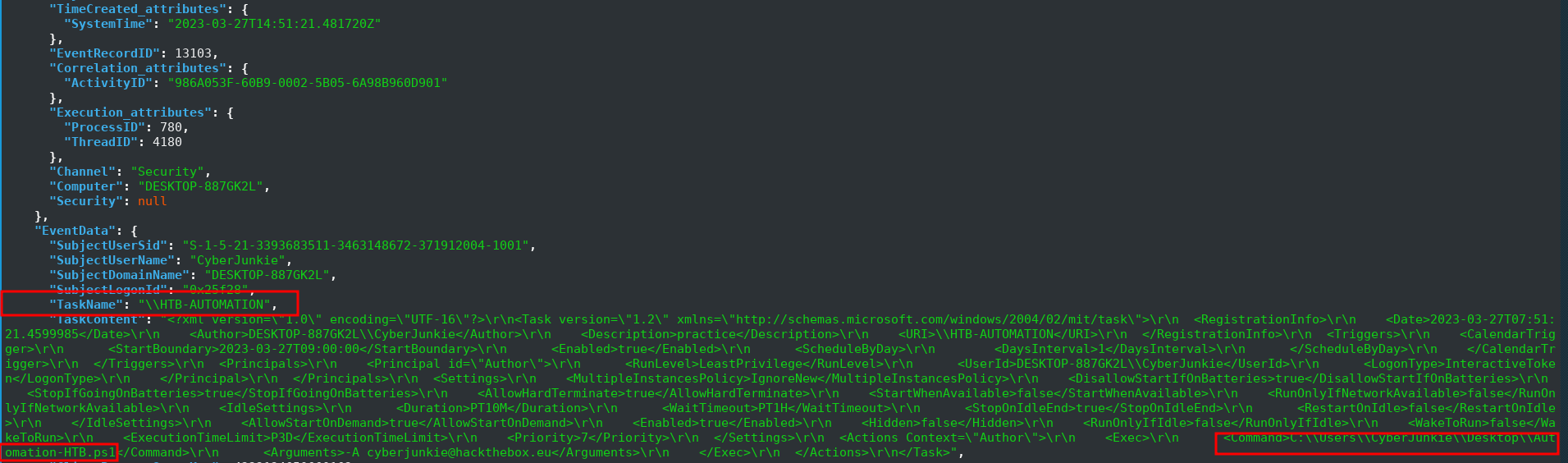
Q5 — The user “cyberjunkie” created a scheduled task. What’s the name of this task?
Answer \\HTB-AUTOMATION
Query Used
cat all_logs.json | jq '.[] | select(.Event.System.EventID == 4698)'
Key fields from the event:
Notes:
EventID 4698 = Scheduled Task Created. Logged in Security.evtx.

Task created at 2023-03-27 14:51:21 UTC by CyberJunkie.
TaskName: \\HTB-AUTOMATION

The TaskContent XML contains the full command and arguments
confirming what the scheduled task was designed to execute.
SubjectUserSid confirms this was created by the CyberJunkie
account, not a system process
MITRE ATT&CK:
| Tactic | Technique | ID |
|---|---|---|
Persistence |
Scheduled Task/Job: Scheduled Task | T1053.005 |
Execution |
Scheduled Task/Job | T1053 |
Q6 — What’s the full path of the file which was scheduled for the task?
Answer C:\\Users\\CyberJunkie\\Desktop\\Automation-HTB.ps1
Notes:
Extracted from the TaskContent XML field in the same EventID 4698
event from Q5. The TaskContent contains the full XML definition
of the scheduled task including the command to execute:

  C:\Users\CyberJunkie\Desktop\Automation-HTB.ps1

The file is a PowerShell script located on the user's Desktop —
not hidden in AppData or system directories, suggesting the
attacker was less concerned about concealment at this stage or
the script serves a legitimate-looking purpose.
Q7 — What are the arguments of the command?
Answer -A cyberjunkie@hackthebox.eu
Notes:
Extracted from the TaskContent XML field in EventID 4698 (Q5).

Full command:
  C:\Users\CyberJunkie\Desktop\Automation-HTB.ps1 -A cyberjunkie@hackthebox.eu

The -A flag with an email address suggests the script accepts
an email parameter — likely for sending results or notifications.
Combined with the GetFileHash command found in Q11, this indicates
the script may compute a hash of itself or another file and email
the result to the attacker — a simple data exfiltration or
integrity verification mechanism.
MITRE ATT&CK:
| Tactic | Technique | ID |
|---|---|---|
Exfiltration |
Exfiltration Over Alternative Protocol | T1048 |
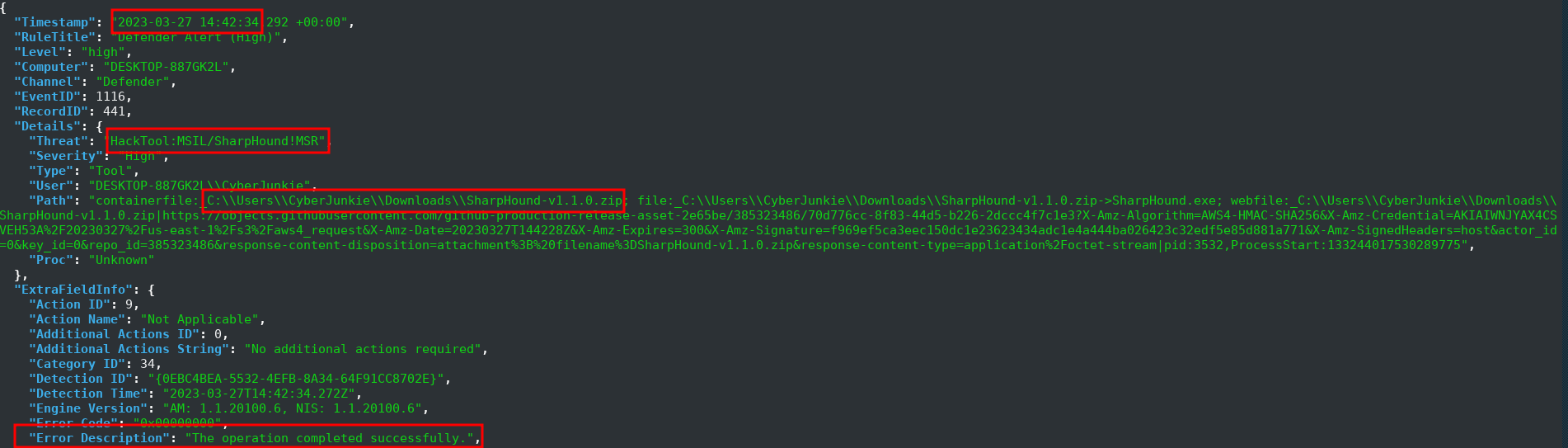
Q8 — The antivirus running on the system identified a threat and performed actions on it. Which tool was identified as malware by antivirus?
Answer SharpHound
Query used:
cat logjammer.json | jq 'select(.RuleTitle == "Defender Alert (High)")'
Key fields from the event:
Notes:
Defender EventID 1116 = Threat detected.

Two simultaneous detections at 14:42:34 UTC:
  1. HackTool:PowerShell/SharpHound.B  → SharpHound.ps1
  2. HackTool:MSIL/SharpHound!MSR      → SharpHound.exe

Both detected inside SharpHound-v1.1.0.zip downloaded directly
from GitHub (Origin: Internet, Source: Downloads and attachments).

SharpHound is the data collector component of BloodHound — an
Active Directory attack path analysis tool. It enumerates:
  - All users, groups, computers, and GPOs
  - Access Control Lists (ACLs)
  - Session data (who is logged in where)
  - Trust relationships

The collected data is fed into BloodHound to visualise attack
paths from any user to Domain Admin. This indicates the attacker
was planning full Active Directory compromise.
MITRE ATT&CK:
| Tactic | Technique | ID |
|---|---|---|
Discovery |
Permission Groups Discovery: Domain Groups | T1069.002 |
Discovery |
Account Discovery: Domain Account | T1087.002 |
Collection |
Data from Local System | T1005 |
Q9 — What’s the full path of the malware which raised the alert?
Answer C:\\Users\\CyberJunkie\\Downloads\\Sharphound-v1.1.0.zip
Notes:
Extracted from the Path field of Defender EventID 1116 in Q8.

Full path from the event:
  containerfile: C:\Users\CyberJunkie\Downloads\SharpHound-v1.1.0.zip

The "containerfile:" prefix indicates Defender detected the threat
inside a ZIP archive before extraction. The file was downloaded
directly to the Downloads folder from:

  https://objects.githubusercontent.com/github-production-release-asset-2e65be/385323486/...

This is the official BloodHound GitHub release — the attacker
downloaded the tool directly from its public repository rather
than using a custom or obfuscated version, suggesting confidence
that Defender would not block it (or they had already disabled
real-time protection and this was a delayed detection).
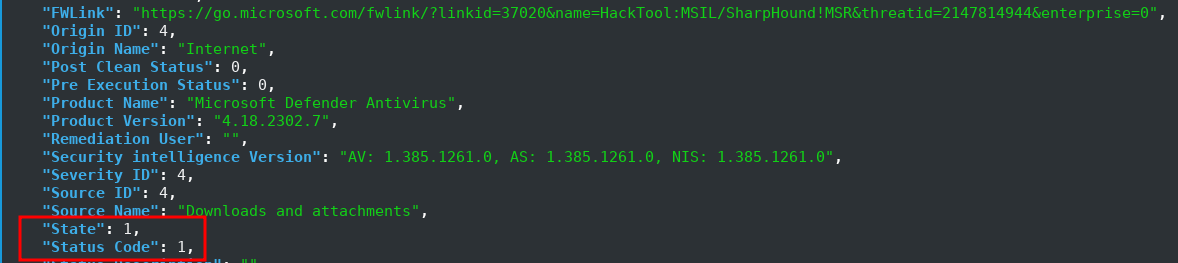
Q10 — What action was taken by the antivirus?
Answer Quarantine
Notes:
Identified from the State field in Defender EventID 1116 (Q8).

Windows Defender State field mapping:
  0 = Unknown
  1 = Quarantined  ← this event
  2 = Removed
  3 = Allowed
  4 = No Action

State: 1 = Quarantined — Defender successfully quarantined
SharpHound before it could be executed.

Important distinction:
  Action ID: 9 = "Not Applicable" — refers to the remediation
  action TYPE, not the outcome. This is often confused with
  "no action taken." The actual result is always in State field.

Both SharpHound.ps1 and SharpHound.exe were quarantined
simultaneously at 14:42:34 UTC inside the ZIP archive.
Q11 — The user used Powershell to execute commands. What command was executed by the user?
Answer Get-FileHash -Algorithm md5 .\Desktop\Automation-HTB.ps1
Query used (Splunk):
#splunk Query
source="all_logs.json" host="parrot" sourcetype="_json"   "Event.System.Channel"="Microsoft-Windows-PowerShell/Operational"
| spath input=_raw output=Timestamp path="Event.System.TimeCreated_attributes.SystemTime"
| spath input=_raw output=EventID path="Event.System.EventID"
| spath input=_raw output=Command path="Event.EventData.ScriptBlockText"
| where Timestamp>"2023-03-27 14:37*"
| search "Event.System.EventID"=4104
| table Timestamp,EventID, Command
Output:

Notes:
Splunk used here instead of jq because PowerShell Script Block
Logging (EventID 4104) generates many events and Splunk's tabular
output makes it easier to read ScriptBlockText content clearly.

Filtered by:
  Channel: Microsoft-Windows-PowerShell/Operational
  EventID: 4104 (Script Block Logging)
  Timestamp: after initial login at 14:37

Two commands found:
  1. "prompt" — benign, just checking the PS prompt
  2. Get-FileHash -Algorithm md5 .\Desktop\Automation-HTB.ps1

Get-FileHash computes the MD5 hash of the scheduled task script
(Automation-HTB.ps1). Combined with the email argument in Q7,
the attacker likely computed the hash and emailed it — either
as a verification that the correct script is installed, or as
a simple data exfiltration confirmation mechanism.

Executed at: 2023-03-27 14:58:33 UTC
MITRE ATT&CK:
| Tactic | Technique | ID |
|---|---|---|
Execution |
Command & Scripting Interpreter: PowerShell | T1059.001 |
Collection |
Data Staged | T1074 |
Q12 — We suspect the user deleted some event logs. Which Event log file was cleared?
Answer Microsoft-Windows-Windows Firewall With Advanced Security/Firewall
Query used (Splunk) #1:
#Splunk Query 1 to check all RuleTitles
source="logjammer.json" host="parrot" sourcetype="_json" | stats count by RuleTitle

Query used (Splunk) #2:
#Splunk Query 2
source="logjammer.json" host="parrot" sourcetype="_json"  RuleTitle="Log File Cleared"

{
    "Timestamp": "2023-03-27 15:01:56.515 +00:00",
    "RuleTitle": "Log File Cleared",
    "Level": "med",
    "Computer": "DESKTOP-887GK2L",
    "Channel": "Sys",
    "EventID": 104,
    "RecordID": 2186,
    "Details": {
        "Log": "Microsoft-Windows-Windows Firewall With Advanced Security/Firewall",
        "User": "CyberJunkie"
    },
    "ExtraFieldInfo": {
        "BackupPath": "",
        "SubjectDomainName": "DESKTOP-887GK2L"
    },
    "RuleID": "ed90ed4f-0d93-4f1a-99a2-4b9003b750a7"
}
Notes:
Two relevant EventIDs for log clearing:
  EventID 102 = Log clearing occurred (no details on which log)
  EventID 104 = Log file cleared WITH the specific log name

Used EventID 104 which provides the Log field containing the
exact log file that was cleared.

The attacker specifically cleared the Firewall log at 15:01:56 —
the same log that contained evidence of the "Metasploit C2 Bypass"
rule addition from Q2 (14:44:43). This is targeted, deliberate
log clearing to remove specific evidence of firewall tampering,
not a blanket wipe of all logs.
MITRE ATT&CK:
| Tactic | Technique | ID |
|---|---|---|
Defense Evasion |
Indicator Removal: Clear Windows Event Logs | T1070.001 |
Complete Attack Timeline
| Timestamp (UTC) | Event | Evidence |
|---|---|---|
2023-03-27 14:37:09 |
CyberJunkie successfully logged in | EID 4624 — Security.evtx |
2023-03-27 14:42:34 |
SharpHound-v1.1.0.zip downloaded and quarantined by Defender | EID 1116 — Defender log |
2023-03-27 14:44:43 |
Firewall rule “Metasploit C2 Bypass” added — port 4444 outbound | EID 2004 — Firewall log |
2023-03-27 14:50:03 |
Audit policy changed — success auditing disabled for Object Access | EID 4719 — Security.evtx |
2023-03-27 14:51:21 |
Scheduled task \HTB-AUTOMATION created | EID 4698 — Security.evtx |
2023-03-27 14:58:33 |
PowerShell Get-FileHash executed on Automation-HTB.ps1 | EID 4104 — PowerShell log |
2023-03-27 15:01:56 |
Firewall event log cleared to remove evidence | EID 104 — System log |
Executive Summary
A user account (CyberJunkie) on DESKTOP-887GK2L performed a series of malicious actions on 2023-03-27 over approximately 25 minutes. After logging in at 14:37, the user downloaded SharpHound — a BloodHound Active Directory enumeration tool — which was quarantined by Windows Defender. Despite this, the attacker proceeded to add a Windows Firewall rule to allow outbound Metasploit C2 traffic on port 4444, then disabled audit logging to reduce visibility of their actions. A persistence mechanism was established via a scheduled task running a PowerShell script. The attacker computed the MD5 hash of the script, likely to verify or exfiltrate it. In a final anti-forensics step, the attacker cleared the Firewall event log to remove evidence of the malicious rule. The entire attack chain was reconstructed through correlation of Security, Firewall, Defender, PowerShell, and System event logs.
Overall MITRE ATT&CK Summary
| Tactic | Technique | ID |
|---|---|---|
| Initial Access | Valid Accounts | T1078 |
| Execution | PowerShell | T1059.001 |
| Execution | Scheduled Task | T1053.005 |
| Persistence | Scheduled Task/Job | T1053.005 |
| Defense Evasion | Disable or Modify System Firewall | T1562.004 |
| Defense Evasion | Disable Windows Event Logging | T1562.002 |
| Defense Evasion | Clear Windows Event Logs | T1070.001 |
| Discovery | Domain Account Discovery | T1087.002 |
| Discovery | Permission Groups Discovery | T1069.002 |
| Collection | Data from Local System | T1005 |
| Command & Control | Non-Standard Port (4444) | T1571 |
Walkthrough by Akenaton · HTB CDSA Portfolio · LogJammer Sherlock