Fruitzy Sherlock Walkthrough
DFIR walkthrough of a phishing-to-RMM backdoor: EML analysis, Edge browser forensics, Amcache/Shimcache timelines, service persistence and OSINT.
Solved Fruitzy from Hack The Box!
[!NOTE] Sherlock Type Phishing / Malware / RMM Backdoor — a full end-to-end forensic methodology covering email analysis, browser forensics, execution artifacts, service persistence, and OSINT. Each question is answered step-by-step with the exact commands and artifacts used.
Scenario
CyberJunkie started out as a junior QA Analyst at his friend’s startup. He called the CEO of the startup because he believed he had mistakenly downloaded something malicious. The CEO sought help from you, his friend in the cybersecurity field. You sent him a guide on collecting evidence from the machine using KAPE. Now you have been given the forensic image so you can analyze and help your friends, as they cannot afford to hire an MSSP.
The forensic triage was acquired with KAPE (Kroll Artifact Parser and Extractor), which is why we have direct access to key artifacts such as browser History, Amcache, Shimcache, and EVTX logs.
Tools Used
| Tool | Purpose |
|---|---|
Text editor / cat |
Parsing EML message headers |
| DB Browser for SQLite | Analyzing Edge browser History and downloads |
RegRipper (rip.exe) |
Parsing Amcache.hve and the SYSTEM hive (Shimcache) |
| Chainsaw | Dumping and searching EVTX logs |
jq |
Filtering and extracting JSON log data |
| VirusTotal | Hash lookup / threat intelligence |
| GoDaddy WHOIS | Domain registration research |
Q1 — Phishing Email Subject
[!TIP] Answer:
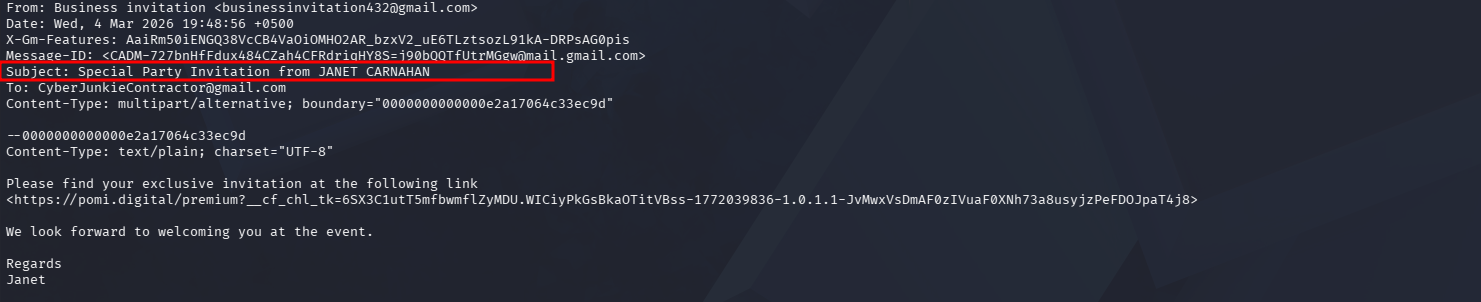
Special Party Invitation from JANET CARNAHAN
[!NOTE] Method — Read the EML file
Special Party Invitation from JANET CARNAHAN.eml. All key metadata —From,To,Subject,Date,Message-ID— is stored in the plaintext email headers.
[!TIP] In an
.emlfile, all important metadata lives in the headers at the top of the plaintext body. This is always the best starting point for email-based phishing analysis.
Q2 — Malicious URI Redirect
[!TIP] Answer:
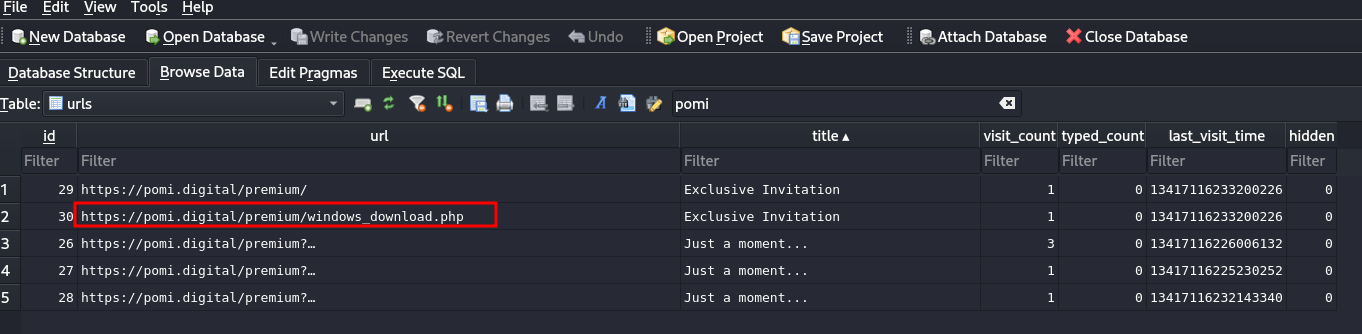
https://pomi.digital/premium/windows_download.php
[!NOTE] Method — Analyze the Edge browser history. The history database lives at:
C:\Users\CyberJunkie\AppData\Local\Microsoft\Edge\User Data\Default\History
Open it with DB Browser for SQLite and search the urls table. The user clicked the link in the phishing email → the browser navigated to the final download page → this navigation was recorded in the history table. This gives us the malicious redirect target (pomi.digital).
Q3 — Downloaded File Name
[!TIP] Answer:
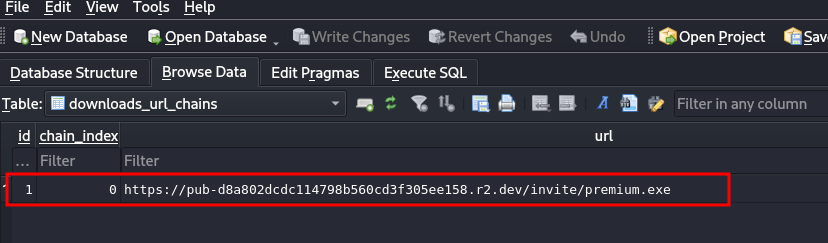
premium.exe
[!NOTE] Method — In the same History database, downloads are recorded in the
downloads_url_chains(ordownloads) table. This is where we find the dropped file namepremium.exetogether with the URL it was downloaded from.
[!TIP] The
downloads_url_chainstable ties each download to its originating URL. The actual file name is stored in thetarget_path/current_pathfields.
Q4 — Malware Execution Time (Amcache)
[!TIP] Answer:
2026-03-04 16:44:33 UTC
[!NOTE] Method — The Amcache.hve hive records program executions. I parsed it with RegRipper; the output shows the timestamp in epoch format
1772642673. Converting it yields2026-03-04 16:44:33 UTC.
1772642673 → 2026-03-04 16:44:33 UTC

[!NOTE] Amcache is one of the most reliable sources for establishing when a binary actually executed on the system — a critical anchor for the attack timeline.
Q5 — Malware SHA256 Hash
[!TIP] Answer:
af240a2c2a4b42e3a130f47ccaab9aa2e20a1a586bc959ee9efd7475055ea7e3
[!NOTE] Method — Amcache provides the MD5 hash (
405481d3d5529445c546d4429b72c5827ebde840). Feed this MD5 into VirusTotal and you will easily recover the corresponding SHA256.
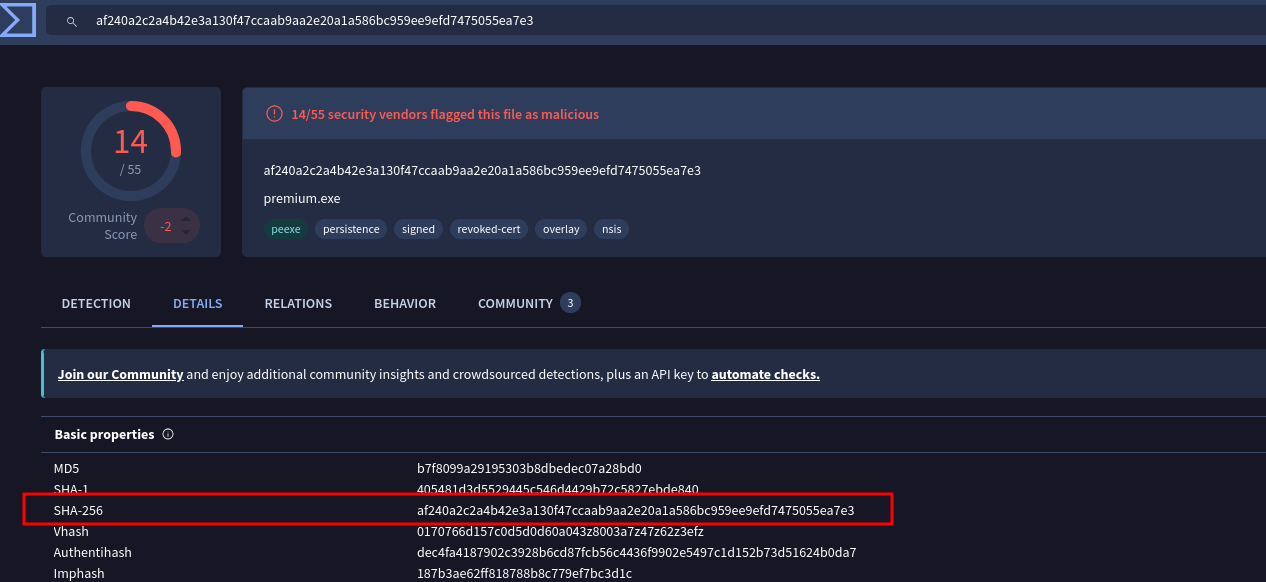
[!TIP] Amcache stores MD5 hashes. When a binary is known to VirusTotal, one hash fully identifies the family — so always pivot between hash formats.
Q6 — Microsoft Defender Scan Start Time
[!TIP] Answer:
2026-03-04T16:48:00
[!NOTE] Method:
- First I checked
C:\ProgramData\Microsoft\Windows Defender\Support— nothing relevant there. - Then I dumped the Defender operational log with Chainsaw:
chainsaw dump "C:\Windows\System32\winevt\Logs\Microsoft-Windows-Windows Defender Operational.evtx" > defender.json
- Filter for Event ID 1000 (scan start):
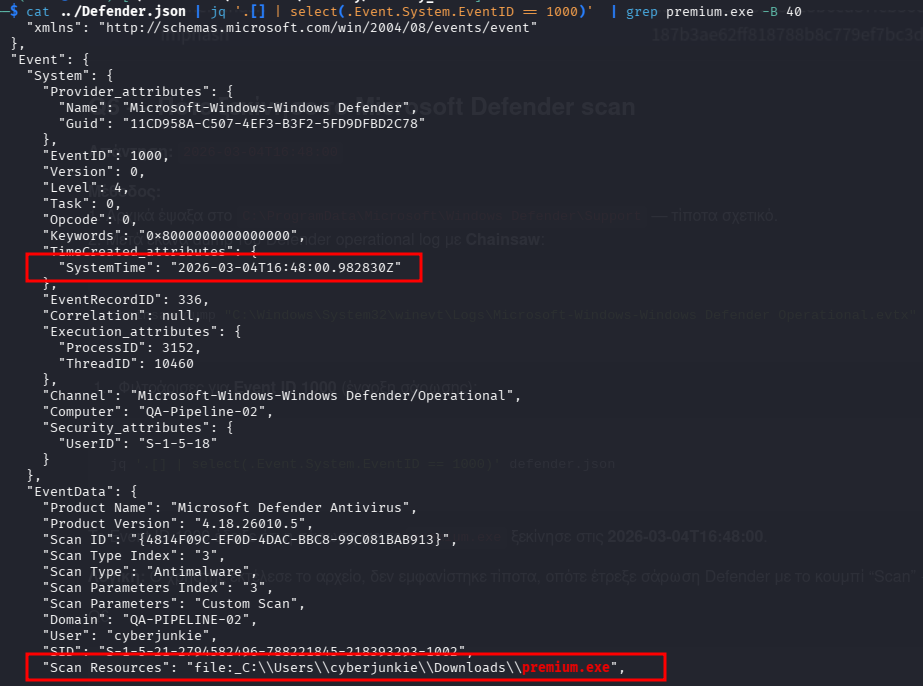
cat ../Defender.json | jq '.[] | select(.Event.System.EventID == 1000)' | grep premium.exe -B 40
Event ID 1000 showed that the scan for premium.exe began at 2026-03-04T16:48:00. The user executed the file, nothing visibly happened, so they ran a manual Defender scan via the “Scan” button — this was captured as Event ID 1000.
Q7 — RMM Backdoor Service Name
[!TIP] Answer:
CentraStage
[!NOTE] Method — Windows records every installation of a new service in System.evtx with Event ID 7045. Dump the log with Chainsaw and filter:
chainsaw dump "C:\Windows\System32\winevt\Logs\System.evtx" > system.json

jq -r '.[] | select(.Event.System.EventID == 7045) |
  [(.Event.System.TimeCreated_attributes.SystemTime), (.Event.EventData.ServiceName), (.Event.EventData.ImagePath)] |
  join(" ---> ")' system.json | grep "2026-03-04"

[!NOTE] CentraStage is a well-known RMM (Remote Monitoring & Management) tool — frequently leveraged by attackers as a backdoor for persistent remote access.
Q8 — Modified Timestamp of RMM Executables (Timestamp Stomping)
[!TIP] Answer:
2026-02-09 07:56:40 UTC
[!NOTE] Method — The Shimcache / AppCompatCache (stored in the SYSTEM hive) keeps execution-related timestamps. I analyzed the SYSTEM hive with RegRipper:
regripper -r Windows/System32/config/SYSTEM -aT | grep -i "centra"
1770623800|REG|||M... AppCompatCache - C:\Program Files (x86)\CentraStage\Gui.exe
1770623800|REG|||M... AppCompatCache - C:\Program Files (x86)\CentraStage\CagService.exe
1772644583|BAM|||\Device\HarddiskVolume3\Program Files (x86)\CentraStage\CagService.exe (S-1-5-18)
The epoch 1770623800 converts to 2026-02-09 07:56:40.

[!WARNING] Timestamp stomping — The service was installed on 04/03, yet the modified timestamp reads 09/02 — three weeks earlier! The attacker backdated the files to look old and legitimate, obscuring the malware’s placement within the timeline. This timestamp inconsistency between install time and modified time is the key red flag.
Q9 — RMM Tool Company
[!TIP] Answer:
Datto
[!NOTE] Method — A simple web search. CentraStage is a product of Datto (Datto acquired CentraStage). Today it is also referred to as “Datto RMM”.
[!TIP] Common RMM tools abused in attacks include AnyDesk, TeamViewer, ScreenConnect, Atera, Splashtop, LogMeIn, and CentraStage/Datto RMM.
Q10 — Domain Registration Date
[!TIP] Answer:
2026-02-20 01:06:05
[!NOTE] Method — WHOIS lookup for
pomi.digital(GoDaddy WHOIS). The domain was registered ~2 weeks before the phishing campaign (04/03).
https://ie.godaddy.com/whois/results.aspx?domain=pomi.digital
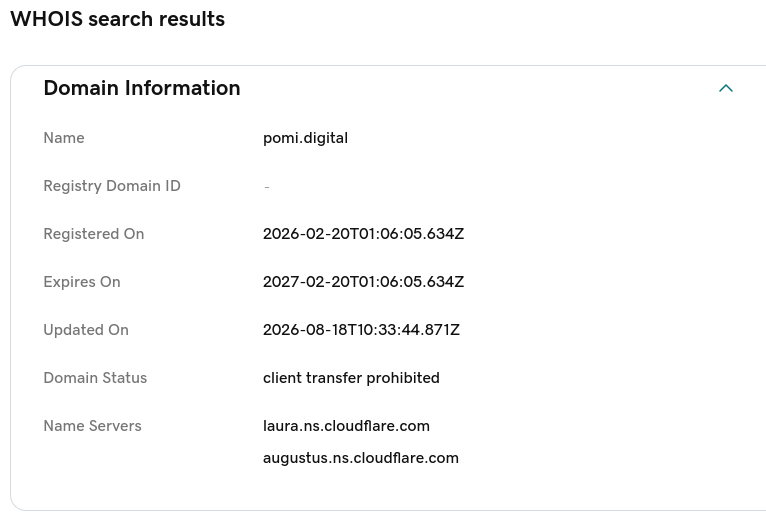
[!WARNING] Freshly registered, low-reputation domains are a red flag — they are often bulk-created for phishing and fast-flux infrastructure, and they make excellent indicators of compromise (IOCs).
Q11 — Malware Alternative Name
[!TIP] Answer:
5bxrx.exe
[!NOTE] Method — On the VirusTotal details page for SHA256
af240a2c2a..., the “Names” section lists every file name under which the malware has been observed.5bxrx.exeis one of those.
[!TIP] Malware samples accumulate many names from different sources (sandboxes, AV vendors, other campaigns). Every one of them is a valid IOC for hunting across your environment.
Attack Timeline
| Timestamp (UTC) | Event | Artifact |
|---|---|---|
| 04/03 14:48 | Phishing email sent | EML headers |
| 04/03 ~14:48 | User clicks link → redirect | Edge History |
| 04/03 ~14:48 | premium.exe downloaded |
Edge downloads |
| 04/03 16:44:33 | premium.exe executed |
Amcache |
| 04/03 16:44:45 | CentraStage service installed |
System.evtx (7045) |
| 04/03 16:48:00 | Defender manual scan starts | Defender Operational (1000) |
| 2026-02-09 | (stomped) modified timestamp | Shimcache |
| 2026-02-20 | pomi.digital domain registered |
WHOIS |
[!NOTE] Note on the timeline: register the domain (02/20) → stomp timestamps (02/09) → phish (03/04) → execute (03/04) → persist (03/04) → scan (03/04). The sequence of events is consistent with a pre-staged C2 domain and an attacker who actively tried to hide their persistence.
MITRE ATT&CK Mapping
| TTP | Tactic | Description |
|---|---|---|
| T1566.002 | Initial Access | Spearphishing Link |
| T1204.002 | Execution | User Execution: Malicious File |
| T1105 | C2 | Ingress Tool Transfer |
| T1543.003 | Persistence | Windows Service (CentraStage) |
| T1219 | Remote Access | Remote Access Software |
| T1070.006 | Defense Evasion | Timestomp |
| T1583.001 | Resource Development | Acquire Domain |
Key Takeaways
- Follow the natural attack flow: email → browser → execution → persistence. Anchoring each stage to an artifact builds a solid timeline.
- Amcache for execution evidence, Shimcache/AppCompatCache for timestamps.
- Event ID 7045 = new service → always check for RMM tools when you see it.
- Timestamp inconsistencies (modified earlier than install/created) = red flag for timestomping.
- Freshly registered domains (< 30 days old) are suspicious infrastructure.
- VirusTotal provides all hashes and alternative file names for a sample — pivot to it early.