Trojan Sherlock Walkthrough
Multi-source investigation of a trojanized FinalRecovery installer: memory, network and disk forensics used together to reconstruct C2 communication and payload delivery.
Solved Trojan from Hack The Box!
Attack Timeline
| Timestamp (UTC) | Event | Evidence Source |
|---|---|---|
| 2023-05-30 02:06:29 | First execution of Recovery_Setup.exe (trojanized FinalRecovery installer) by user John from C:\Users\John\Downloads\Data_Recovery\ |
Prefetch (PECmd) |
| 2023-05-30 02:06:48 | Rec528.exe (PID 3068) spawned — first run of embedded payload, installed to C:\Program Files (x86)\FLSCover\Rec528\ |
strings on memory dump |
| 2023-05-30 02:07:59 | Second execution of Recovery_Setup.exe (PID 484) |
windows.pslist, Prefetch |
| 2023-05-30 02:08:01 | Rec528.exe (PID 4012) spawned via is-NJBAT.tmp (PID 5956) — second run |
windows.pstree |
| 2023-05-30 06:56:04 | Data_Recovery.zip downloaded from praetorial-gears.000webhostapp.com |
network.pcapng |
| 2023-05-30 06:58:43 | C2 communication begins — HTTP GET requests to 45.12.253.72 (stuk.php, puk.php) |
network.pcapng |
| 2023-05-30 06:58:44 | Binary payload downloaded from C2 via puk.php |
network.pcapng, VirusTotal |
Summary: A user named John on workstation DESKTOP-38NVPD0 (Windows 10 build 19041) downloaded a file called Data_Recovery.zip from a free hosting site (praetorial-gears.000webhostapp.com). The ZIP contained Recovery_Setup.exe — a trojanized version of the legitimate FinalRecovery v3.0.7.0325 data recovery software, packaged as an Inno Setup installer. Upon execution, the malware installed to C:\Program Files (x86)\FLSCover\Rec528\ and established C2 communication with multiple servers in the 45.12.253.x range via PHP endpoints. The C2 infrastructure served additional binary payloads to the compromised machine.
Tools used: Volatility 3, Wireshark/tshark, PECmd (Eric Zimmerman), pyad1, exiftool, innoextract, Joe Sandbox, VirusTotal
Q1 — What is the build version of the operating system?
Answer: 19041
We used the windows.info plugin to retrieve system metadata from the memory dump:
$ vol3 -f memory\ capture/memory.vmem windows.info
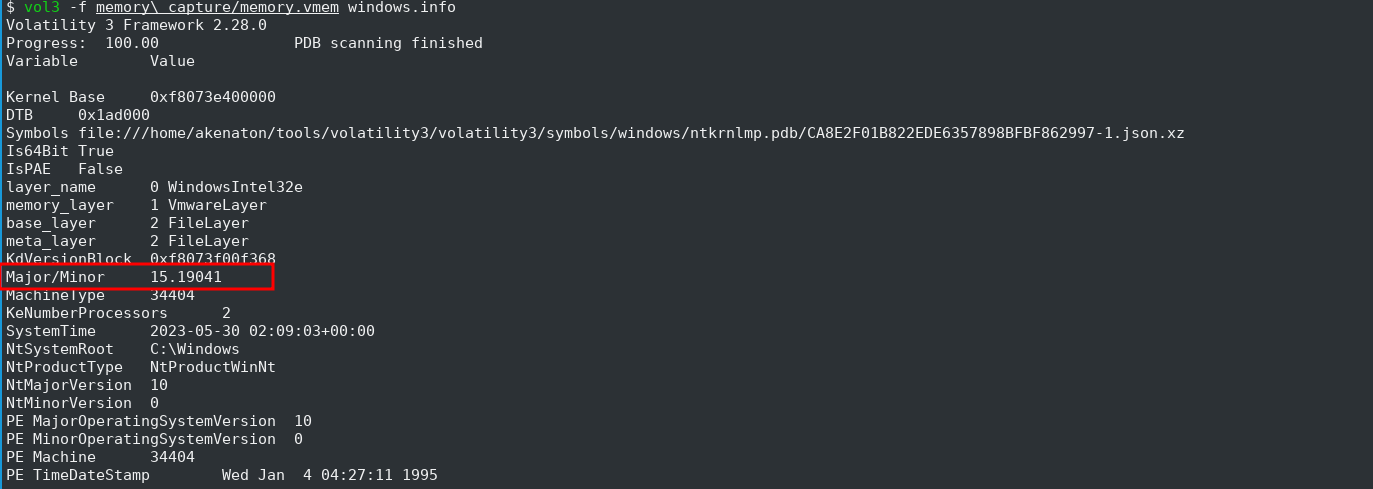
Key indicators:
- The Major/Minor field shows 15.19041 — the minor version 19041 is the OS build number
- This corresponds to Windows 10 version 2004 (May 2020 Update), also known as 20H1
- Build 19041 is the base build for Windows 10 2004/20H1/20H2/21H1/21H2 — further feature updates share this same base build number
- Additional useful info from the output: 64-bit system, 2 processors, SystemTime 2023-05-30 02:09:03 UTC, system root at
C:\Windows
Q2 — What is the computer hostname?
Answer: DESKTOP-38NVPD0
We used the windows.envars plugin to extract environment variables from all running processes and filtered for the COMPUTERNAME variable:
$ vol3 -f memory\ capture/memory.vmem windows.envars | grep -i "ComputerName" | head -10
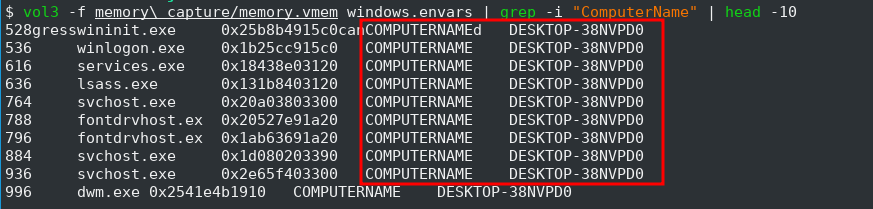
Key indicators:
- The
COMPUTERNAMEenvironment variable consistently shows DESKTOP-38NVPD0 across all processes (smss, winlogon, services, lsass, svchost, etc.) - The
DESKTOP-XXXXXXXnaming convention is the default Windows 10 auto-generated hostname, suggesting the machine was never renamed by an administrator - This hostname is useful for correlating events across different evidence sources (network capture, disk artifacts, logs)
Alternative approach: The hostname can also be retrieved from the registry in memory:
$ vol3 -f memory\ capture/memory.vmem windows.registry.printkey --key "ControlSet001\Control\ComputerName\ComputerName"
Q3 — What is the name of the downloaded ZIP file?
Answer: Data_Recovery.zip
We analyzed the network capture using tshark, filtering HTTP requests containing .zip in the URI:
$ tshark -r packet\ capture/network.pcapng -Y "http.request.uri contains\".zip\"" -T fields -e frame.time -e ip.src -e ip.dst -e http.request.full_uri

The output reveals two HTTP requests for the same ZIP file:
- 2023-05-30 09:56:04 EEST —
192.168.116.133→145.14.144.155(initial GET request) - 2023-05-30 09:56:17 EEST —
145.14.144.155→192.168.116.133(follow-up request, likely a redirect or retry)
For deeper inspection, we examined the HTTP request in Wireshark with a display filter of http and searched packet bytes for the string .zip:
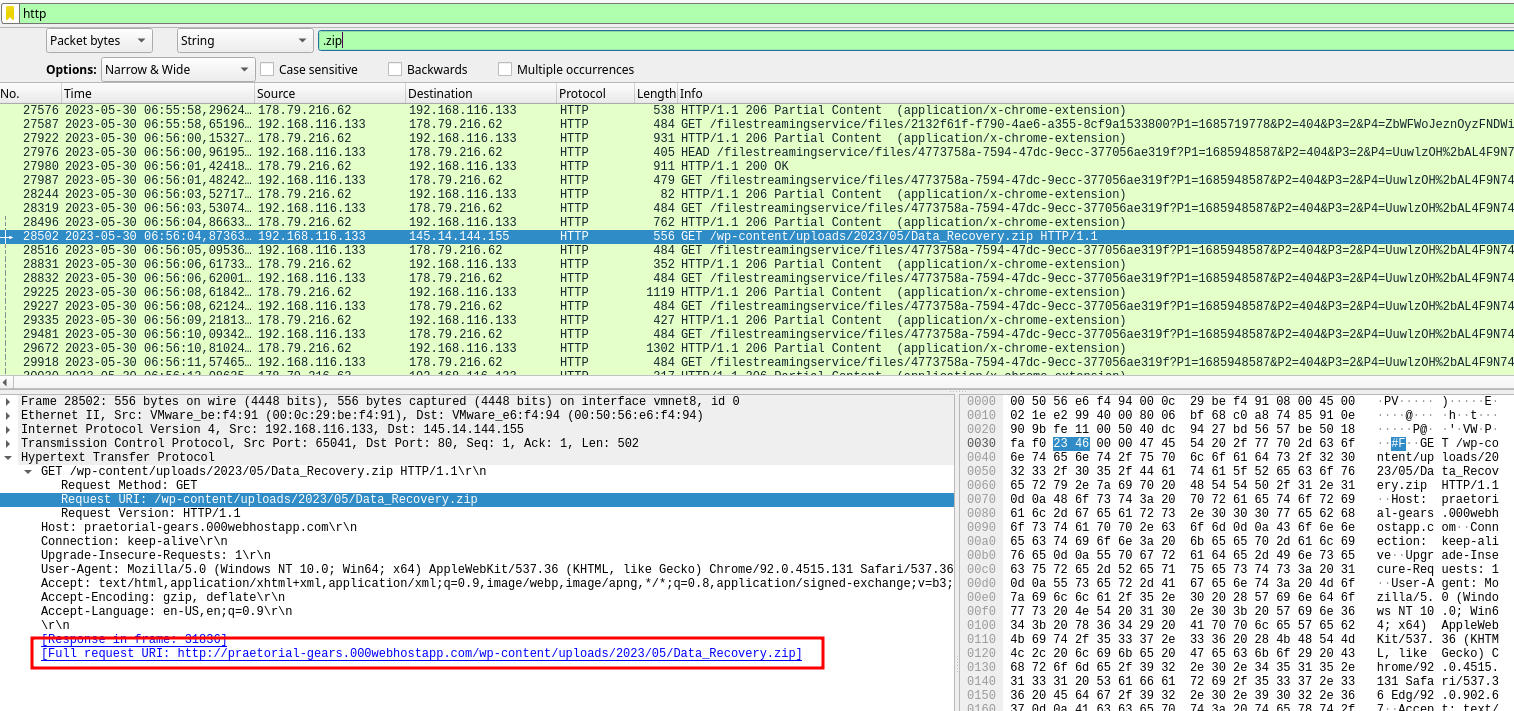
Key indicators:
- The full download URL is
http://praetorial-gears.000webhostapp.com/wp-content/uploads/2023/05/Data_Recovery.zip - The file is hosted on 000webhostapp.com — a free web hosting service commonly abused by threat actors for malware distribution
- The URL path contains
/wp-content/uploads/— indicating a WordPress site, possibly compromised and used to host the malicious payload - The User-Agent shows Chrome/92.0.4515.131 — the victim was using Google Chrome to download the file
- The source IP 192.168.116.133 is our victim machine, and 145.14.144.155 is the hosting server
Q4 — What is the domain of the website (including the third-level domain) from which the file was downloaded?
Answer: praetorial-gears.000webhostapp.com
This was already identified in Q3 from the full request URI in the HTTP GET request:
http://praetorial-gears.000webhostapp.com/wp-content/uploads/2023/05/Data_Recovery.zip
Key indicators:
- Third-level domain (subdomain):
praetorial-gears— the attacker-controlled subdomain - Second-level domain:
000webhostapp.com— a free hosting platform by Hostinger, frequently abused for phishing and malware delivery due to its zero-cost, low-barrier sign-up - Free hosting services like this are attractive to threat actors because they require minimal identity verification and can be quickly spun up and discarded
Q5 — The user then executed the suspicious application found in the ZIP archive. What is the process PID?
Answer: 484
Since we know the downloaded file was Data_Recovery.zip, we searched for a process with a related name using windows.pslist:
$ vol3 -f memory\ capture/memory.vmem windows.pslist | grep -i "recovery" | column -t

Key indicators:
- PID 484 —
Recovery_Setupprocess, clearly correlated with the downloadedData_Recovery.ziparchive - The process was created at 2023-05-30 02:07:59 UTC — note this is the UTC timestamp, while the download in Q3 was at 09:56 EEST (06:56 UTC), indicating the memory capture’s system clock or timezone may differ from the network capture
- PPID 60 — the parent process ID, which would be worth investigating to confirm how the executable was launched (likely
explorer.exeif the user double-clicked it) - The naming convention
Recovery_Setupinside aData_Recovery.zipis a classic social engineering lure — disguising malware as a data recovery utility to trick the victim into executing it
We confirmed this with windows.pstree to see the full process hierarchy:

The process tree reveals the full execution chain:
- PID 60 (
explorer.exe, PPID 4084) → PID 484 (Recovery_Setup) — the user double-clicked the executable from Explorer - PID 484 (
Recovery_Setup) → PID 5956 (is-NJBAT.tmp) → PID 4012 (Rec528.exe) — the malware spawned child processes, indicating a multi-stage payload - The
is-NJBAT.tmpfilename is characteristic of Inno Setup installer temporary files — suggesting the malware was packaged as a fake installer
We also used windows.cmdline to confirm the full executable paths:

- PID 484:
"C:\Users\John\Downloads\Data_Recovery\Recovery_Setup.exe"— confirms the ZIP was extracted to the Downloads folder and executed by user John - PID 5956:
"C:\Users\John\AppData\Local\Temp\is-VIBV9.tmp\is-NJBAT.tmp"— the installer dropped a temporary file into the user’sAppData\Local\Tempdirectory, a common staging location for malware
Q6 — What is the full path of the suspicious process?
Answer: C:\Users\John\Downloads\Data_Recovery\Recovery_Setup.exe
This was already identified in Q5 using the windows.cmdline plugin, which revealed PID 484’s full executable path.
Q7 — What is the SHA-256 hash of the suspicious executable?
Answer: c34601c5da3501f6ee0efce18de7e6145153ecfac2ce2019ec52e1535a4b3193
To get the correct hash, we needed the original on-disk file rather than a memory dump. Dumping from memory with windows.dumpfiles produces files that may differ from the original (due to page alignment, relocation, and partial paging), so the hash won’t match.
Instead, we extracted the file from the disk artifact (disk_artifacts.ad1). Since standard tools (7z, FTK Imager CLI) couldn’t properly parse the AD1 format on Linux, we used pyad1 — a Python library for reading AccessData AD1 images — with a custom extraction script:
$ python3 extract_ad1.py "disk artifacts/disk_artifacts.ad1" "Recovery_Setup"
Then computed the SHA-256 hash of the extracted binary:
$ sha256sum exported_files/Recovery_Setup.exe

Key indicators:
- The SHA-256 hash
c34601c5da...4b3193uniquely identifies this malware sample - This hash can be used to search threat intelligence platforms (VirusTotal, MalwareBazaar, etc.) for known detections and behavioral analysis
- Why not dump from memory? The
windows.dumpfilesplugin reconstructs files from the memory-mappedImageSectionObjectorDataSectionObject, which may not be byte-identical to the on-disk binary — PE sections are page-aligned in memory, and pages can be swapped out, resulting in a different hash
Lesson learned: When a question asks for a file hash, always prefer the disk artifact over memory dumps. Memory-reconstructed files are useful for behavioral analysis but unreliable for hash matching.
Q8 — When was the malicious program first executed?
Answer: 2023-05-30 02:06:29
We extracted the Windows Prefetch file for Recovery_Setup.exe from the disk artifact (disk_artifacts.ad1) and parsed it using PECmd (Eric Zimmerman’s tools):
$ PECmd.exe -f RECOVERY_SETUP.EXE-A808CDAB.pf
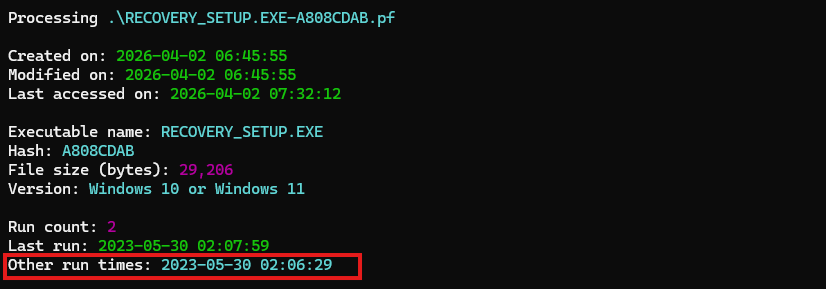
Key indicators:
- Run count: 2 — the executable was run twice
- Last run: 2023-05-30 02:07:59 — the second (most recent) execution, which corresponds to PID 484 we identified in Q5
- Other run times: 2023-05-30 02:06:29 — the first execution
- The answer is from “Other run times” because the question asks for the first execution, not the last
- The ~90-second gap between runs suggests the user may have run the installer once, and then ran it again — possibly because the first execution didn’t appear to do anything visible (a common trait of malware disguised as legitimate software)
Important distinction: Windows Prefetch tracks up to 8 historical timestamps. “Last run” is always the most recent, while “Other run times” contains all previous executions in reverse chronological order. When investigating “first execution,” always check the oldest entry in “Other run times.”
Q9 — How many times in total has the malicious application been executed?
Answer: 2
This was already identified in Q8 from the Prefetch analysis. The Run count: 2 field in the parsed RECOVERY_SETUP.EXE-A808CDAB.pf file confirms the executable was run exactly twice:
- 2023-05-30 02:06:29 — first execution
- 2023-05-30 02:07:59 — second execution
Q10 — The malicious application references two .TMP files, one is IS-NJBAT.TMP, which is the other?
Answer: IS-R7RFP.TMP
From the PECmd Prefetch analysis, we examined the Resources loaded section which lists all files referenced during execution of Recovery_Setup.exe:

q10_tmp_files.png
Key indicators:
- Line 57:
\USERS\JOHN\APPDATA\LOCAL\TEMP\IS-VIBV9.TMP\IS-NJBAT.TMP(Keyword: True) - Line 61:
\USERS\JOHN\APPDATA\LOCAL\TEMP\IS-T97VD.TMP\IS-R7RFP.TMP(Keyword: True) - Both are flagged with Keyword: True, meaning they matched PECmd’s keyword list for suspicious/notable file references
- The two
.TMPfiles reside in different parent temp directories (IS-VIBV9.TMPandIS-T97VD.TMP) — this aligns with the two separate executions found in Q8/Q9, as Inno Setup creates a unique temp directory for each run - These are characteristic of Inno Setup installer temporary files — the malware was packaged as a fake Inno Setup installer to appear legitimate
Q11 — How many of the URLs contacted by the malicious application were detected as malicious by VirusTotal?
Answer: 4
We searched the SHA-256 hash from Q7 (c34601c5da...4b3193) on VirusTotal and examined the Relations tab under Contacted URLs:
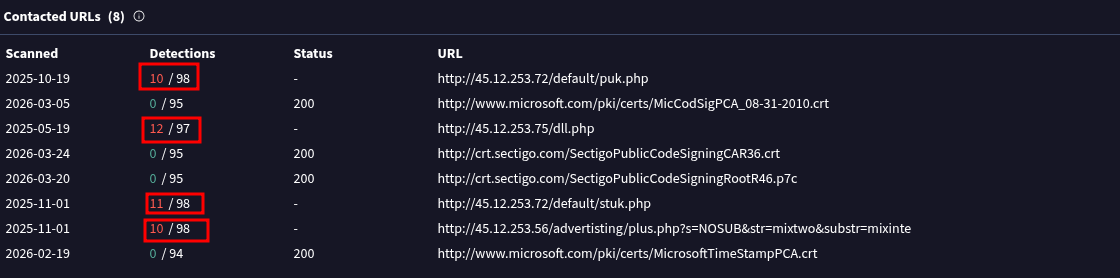
Out of 8 contacted URLs, 4 had detections (non-zero detection count):
| Detections | URL | Analysis |
|---|---|---|
| 10 / 98 | http://45.12.253.72/default/puk.php |
Malicious C2 endpoint |
| 12 / 97 | http://45.12.253.75/dll.php |
Malicious — likely serves a DLL payload |
| 11 / 98 | http://45.12.253.72/default/stuk.php |
Malicious C2 endpoint |
| 10 / 98 | http://45.12.253.56/advertising/plus.php?s=NOSUB&str=mixtwo&substr=mixinte |
Malicious C2 with parameters |
The remaining 4 URLs with 0 detections are legitimate:
microsoft.com— certificate downloads (code signing, timestamp)crt.sectigo.com— Sectigo CA certificate chain files
Key indicators:
- All malicious URLs point to bare IP addresses (
45.12.253.x) rather than domain names — a common C2 pattern to avoid DNS-based detection - The
.phpendpoints suggest a web-based C2 panel - The IPs are in the
45.12.253.0/24range — multiple C2 servers in the same subnet, indicating attacker-controlled infrastructure - The legitimate URLs are related to code signing certificates (Sectigo), suggesting the malware may be digitally signed to appear trustworthy
Q12 — The malicious application downloaded a binary file from one of the C2 URLs, what is the name of the file?
Answer: puk.php
From the VirusTotal analysis in Q11, two PHP endpoints on the C2 server 45.12.253.72 stood out: puk.php and stuk.php. VirusTotal’s behavioral analysis indicated that puk.php served a binary download.
We confirmed the C2 communication in the network capture using Wireshark with the filter:
http.request.method == GET && ip.addr == 45.12.253.72

Key indicators:
- The victim machine (
192.168.116.133) made multiple HTTP GET requests to45.12.253.72: /default/stuk.php— at 06:58:43 and 06:59:53/default/puk.php— at 06:58:44 and 06:59:53- The requests are paired and repeated, suggesting a polling pattern — the malware periodically checks in with the C2 server
puk.phpis the endpoint that served a binary payload to the victim, whilestuk.phplikely handles status/check-in communication- Both endpoints use the
/default/path prefix, consistent with a structured C2 web panel
Q13 — Can you find any indication of the actual name and version of the program that the malware is pretending to be?
Answer: FinalRecovery v3.0.7.0325
This required multiple steps of investigation. First, we gathered clues from our existing analysis:
- exiftool on
Recovery_Setup.exeshowed File Description: FLSCover and File Version: 1.0.5.28 — but this is the Inno Setup installer metadata, not the actual impersonated program - innoextract revealed the installer contained
finalrecovery.chm(a help file) andRec528.exe— hinting the program name is FinalRecovery - strings on the memory dump confirmed the installation path
C:\Program Files (x86)\FLSCover\Rec528\and references tofinalrecovery.chm
However, the exact version v3.0.7.0325 was not directly visible in the memory strings or PE metadata. It was found by submitting the malware sample to Joe Sandbox, which revealed the content of a temporary file (is-AOCSC.tmp) dropped during installation:
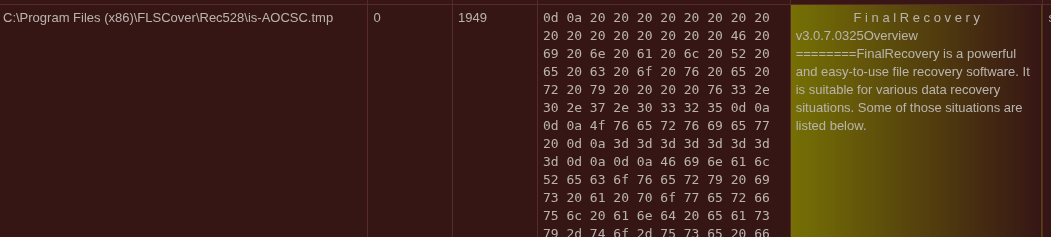
The file at C:\Program Files (x86)\FLSCover\Rec528\is-AOCSC.tmp contains:
FinalRecovery
v3.0.7.0325
Overview
========FinalRecovery is a powerful and easy-to-use file recovery software...
Key indicators:
- FinalRecovery is a legitimate data recovery application — the attacker trojanized it or repackaged it with malware to create a convincing social engineering lure
- The version v3.0.7.0325 is the version of the legitimate software being impersonated
- The installer brand name FLSCover and internal name Cov 1.0.5.28 appear to be the attacker’s modified metadata, while the original product identity was preserved in the help/readme files
- This is a classic trojanized software technique — bundling malware with a legitimate application so the victim sees expected behavior while the malware operates silently in the background
Lesson learned: When identifying impersonated software, check temporary files, help files (
.chm), readme files, and sandbox reports — the PE metadata is often modified by the attacker, but auxiliary files may retain the original product information.